n8n logoChatGPT logo
n8n · ChatGPT

Connect n8n to ChatGPT. For your whole team.

Your n8n already reaches the systems your team asks about: a data table, a Postgres behind the firewall, an internal API. n8n's own MCP options expose that to a chat with one shared bearer token, or signed in as one user. Loopthink turns any workflow into a governed tool through one community node: every ChatGPT user in your team gets their own login and their own role, and nothing has to reach your n8n from the internet.

Free for your own server · Team from €99 · EU-hosted

The problem

n8n in a chat client, today.

Today a team that wants n8n in an AI client either opens the MCP Server Trigger with one bearer token that everyone copies, or connects n8n's instance-level MCP server signed in as one user. Either way the chat gets one person's rights for everybody, and workflows can be built and published from the conversation. The data your workflows move, guest names, order rows, internal API responses, goes to the model unmasked, and nothing says who asked.

Who may do what

One matrix for n8n. Roles across, tools down.

ToolFront deskRevenueManagement
Reservations search Front desk may use Reservations searchRevenue may use Reservations searchManagement may use Reservations search
Guest lookup Front desk may use Guest lookupRevenue may not use Guest lookupManagement may not use Guest lookup
Revenue by property Front desk may not use Revenue by propertyRevenue may use Revenue by propertyManagement may use Revenue by property
Availability (internal API) Front desk may use Availability (internal API)Revenue may use Availability (internal API)Management may not use Availability (internal API)
Write actions off by defaultFront desk may not use Write actionsRevenue may not use Write actionsManagement may not use Write actions

Masked for every role: guest names and emails, phone numbers, payment details in reservation rows.

You set this once. Every ChatGPT user in your team gets exactly this.

How to connect

Once on the n8n side, once in ChatGPT.

n8n logo

On the n8n side

Community node @loopthink/n8n-nodes-loopthink, outbound only. No API key, no inbound port.

  1. 1

    n8n → Settings → Community nodes → Install → @loopthink/n8n-nodes-loopthink. It adds the loopthink Runner trigger and the loopthink node that answers.

  2. 2

    In Loopthink, create the server with n8n as the connection and describe each tool: its name, what it returns, which parameters a model may pass. Passwords, keys and internal addresses stay on your side.

  3. 3

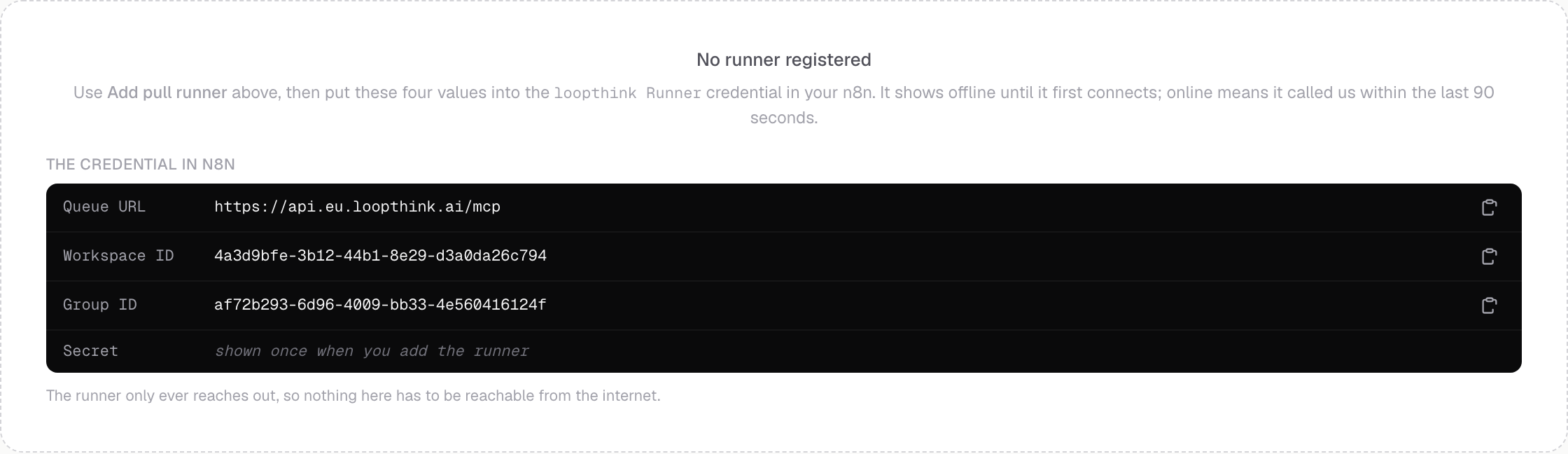
    Under Runners, add a pull runner. Paste its four values into the loopthink Runner credential in n8n; the secret is shown once.

  4. 4

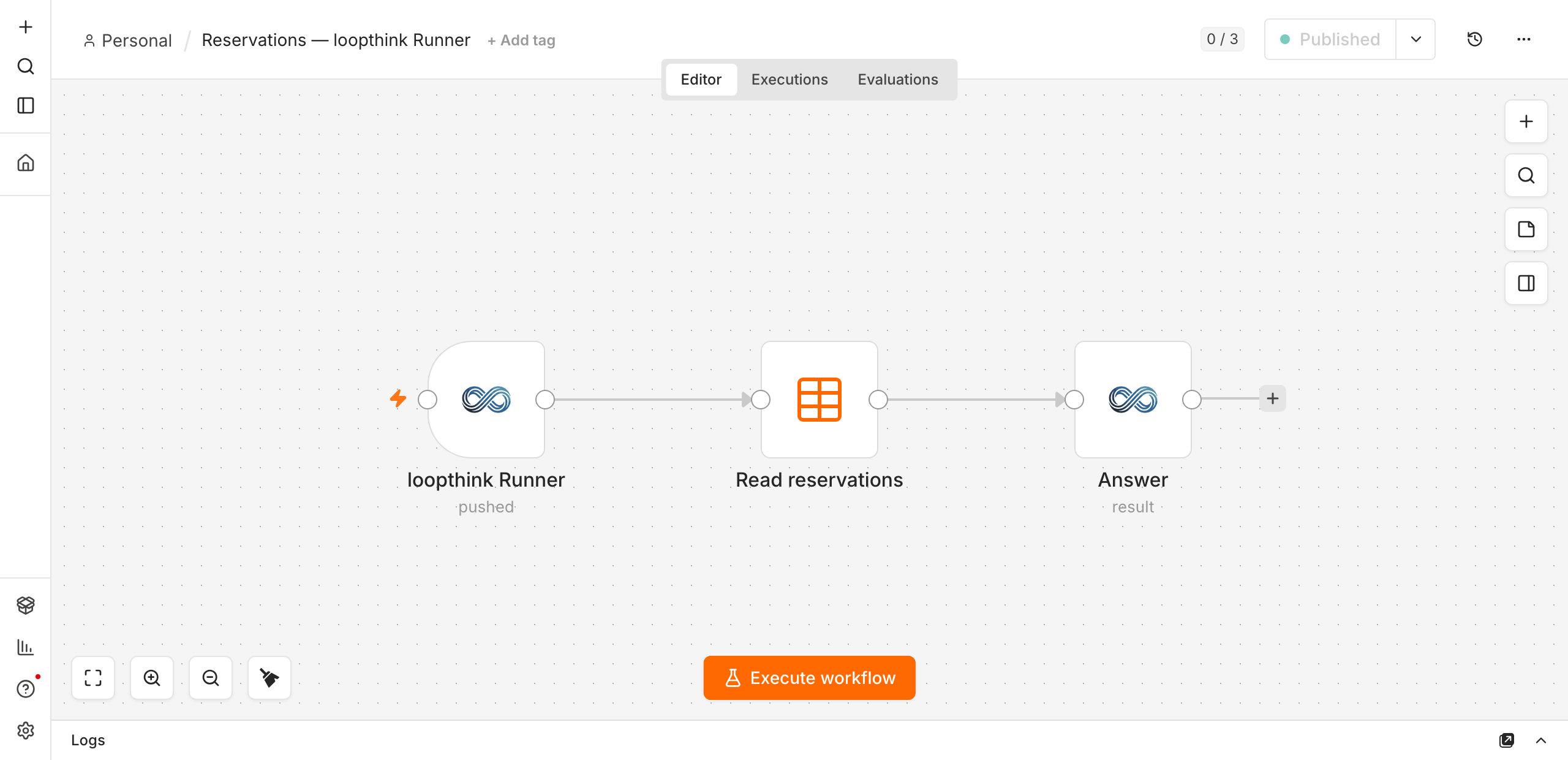
    Build the workflow: the trigger claims a call, a Data Table, Postgres or HTTP Request node reads, Send Result masks and answers. Activate it, and the runner shows online within a minute.

ChatGPT logo

In ChatGPT

Custom connector, OAuth

  1. 1

    An admin turns on Developer mode: Settings → Apps → Advanced settings. On Enterprise and Edu, admins first grant it under Permissions & Roles → Connected Data.

  2. 2

    Workspace settings → Apps → Create: paste your Loopthink connector URL, choose OAuth, click Scan Tools, then Create. Publish the draft under Workspace settings → Apps → Drafts.

  3. 3

    Each team member picks Loopthink from the tools menu in a chat, or @mentions it, and signs in once with their own account.

Full MCP apps are available on ChatGPT Business, Enterprise and Edu; Pro can connect read-only MCP servers in developer mode. Published apps show up in every member's Apps settings with the label custom.

Steps checked against the vendor documentation on 17 September 2026: Loopthink n8n integration · The node on npm · n8n: install community nodes · n8n MCP Server Trigger · n8n instance-level MCP server · Developer mode and MCP apps in ChatGPT · Connectors in ChatGPT

Loopthink sits in between: it holds the key, shows ChatGPT a normal login, and applies your roles on every call.

Walkthrough

A reservations table, asked from ChatGPT.

A hotel group keeps its reservations in an n8n data table: guest, property, booking date, nights, total. The team wants to ask “which reservations were booked in April?” in ChatGPT and get an answer, without the table ever leaving their network.

You define the tool

Its name, what it does and which parameters a model may pass. That is the contract, and it lives in Loopthink.

Your workflow answers

A three-node workflow is enough: claim the call, read the source, send the result back masked.

Outbound only

The runner calls us. Nothing has to reach your n8n from the internet, and no credential reaches us.

  1. 1

    Install the node

    In n8n, Settings → Community nodes → Install, package @loopthink/n8n-nodes-loopthink. It adds two nodes: the loopthink Runner trigger and the loopthink node that answers.

  2. 2

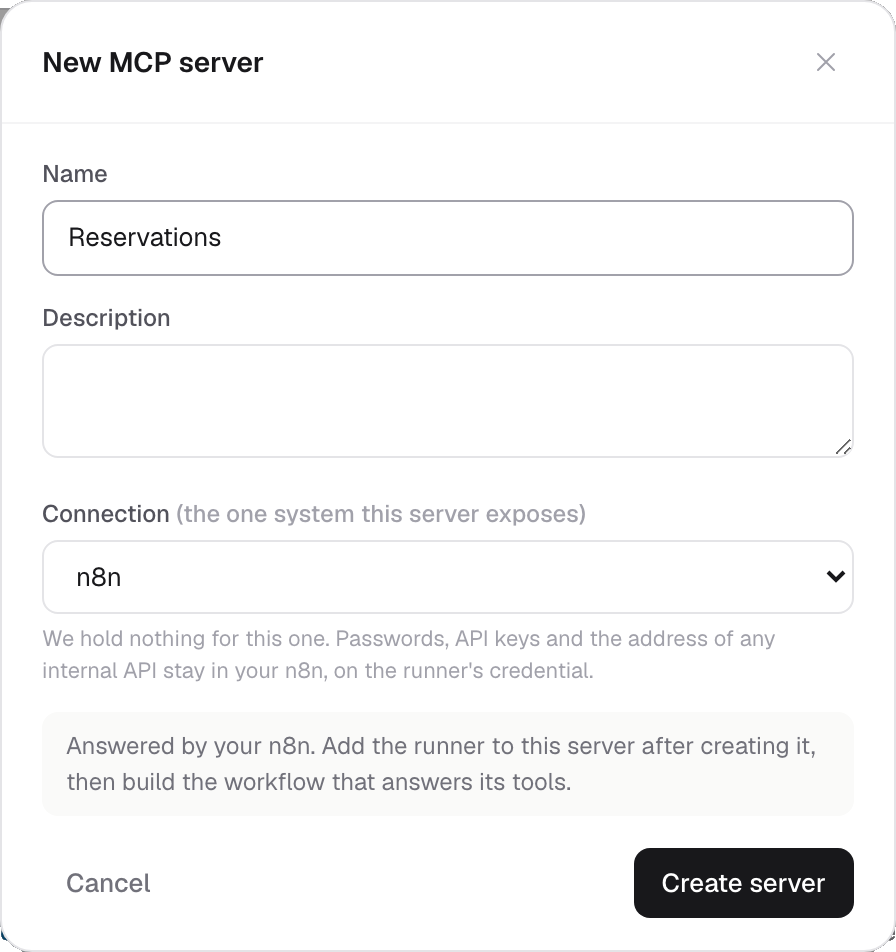
    Create the server in Loopthink

    Pick n8n as the connection. It asks for nothing else: passwords, API keys and the address of any internal system stay on your side.

    The new MCP server dialog with n8n selected as the connection (n8n and Loopthink, for ChatGPT)
  3. 3

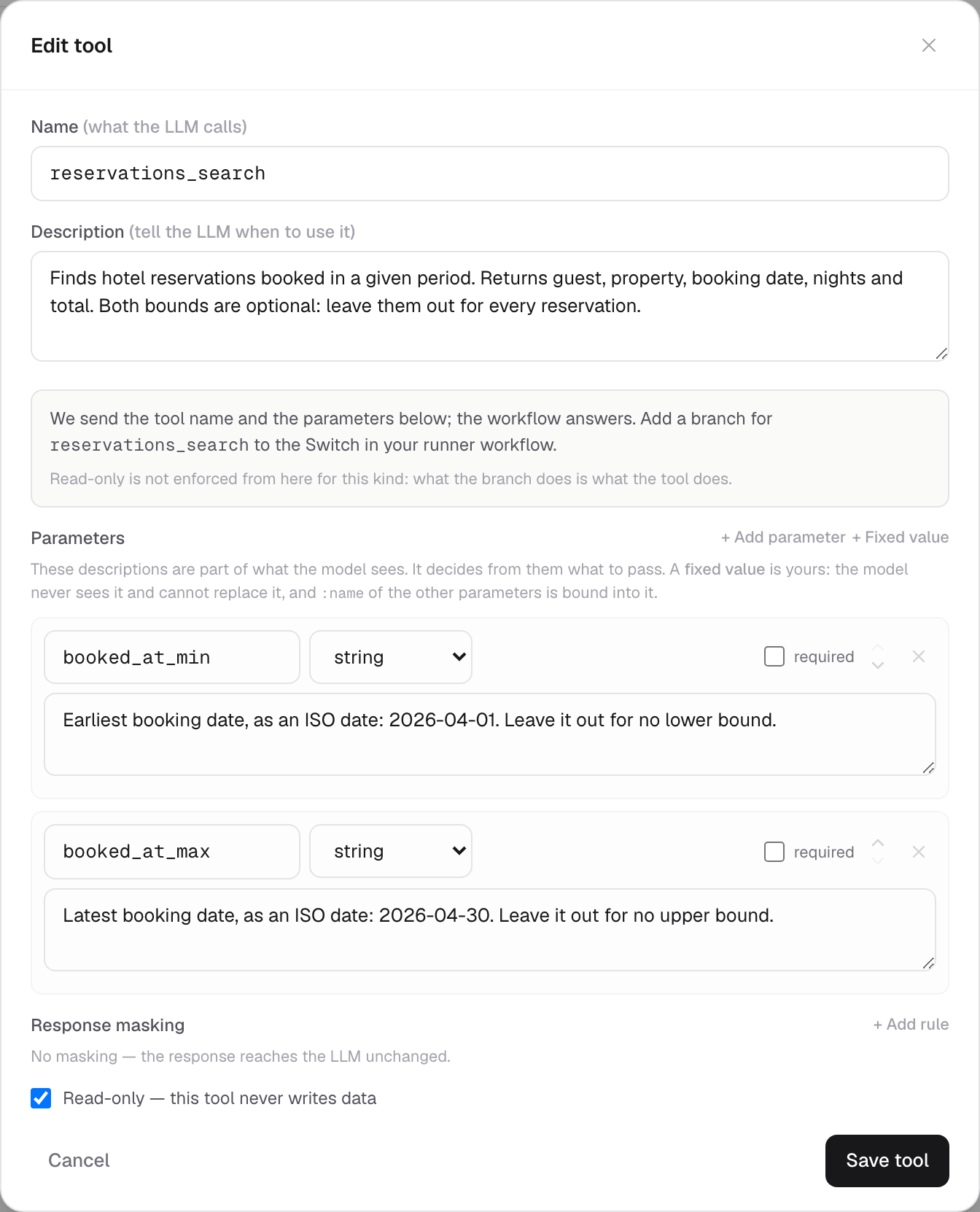
    Describe the tool

    Name it, say what it returns, and declare the parameters a model may pass. Here that is two optional bounds, booked_at_min and booked_at_max. The descriptions matter: they are what the model reads to decide what to send.

    The tool dialog with two optional date bounds (n8n and Loopthink, for ChatGPT)
    Both optional, so “all reservations” is a valid question too.
  4. 4

    Add a runner and connect it

    Under Runners, add a pull runner. You get four values; paste them into the loopthink Runner credential in n8n. The secret is shown once.

    The four values the runner credential in n8n needs (n8n and Loopthink, for ChatGPT)
  5. 5

    Build the workflow

    Three nodes. The trigger claims a call, the Data Table node reads, and Send Result masks the rows and sends them back. Activate it, and the runner shows online within a minute.

    A three node workflow: loopthink Runner, Read reservations, Answer (n8n and Loopthink, for ChatGPT)
  6. 6

    Wire the filters

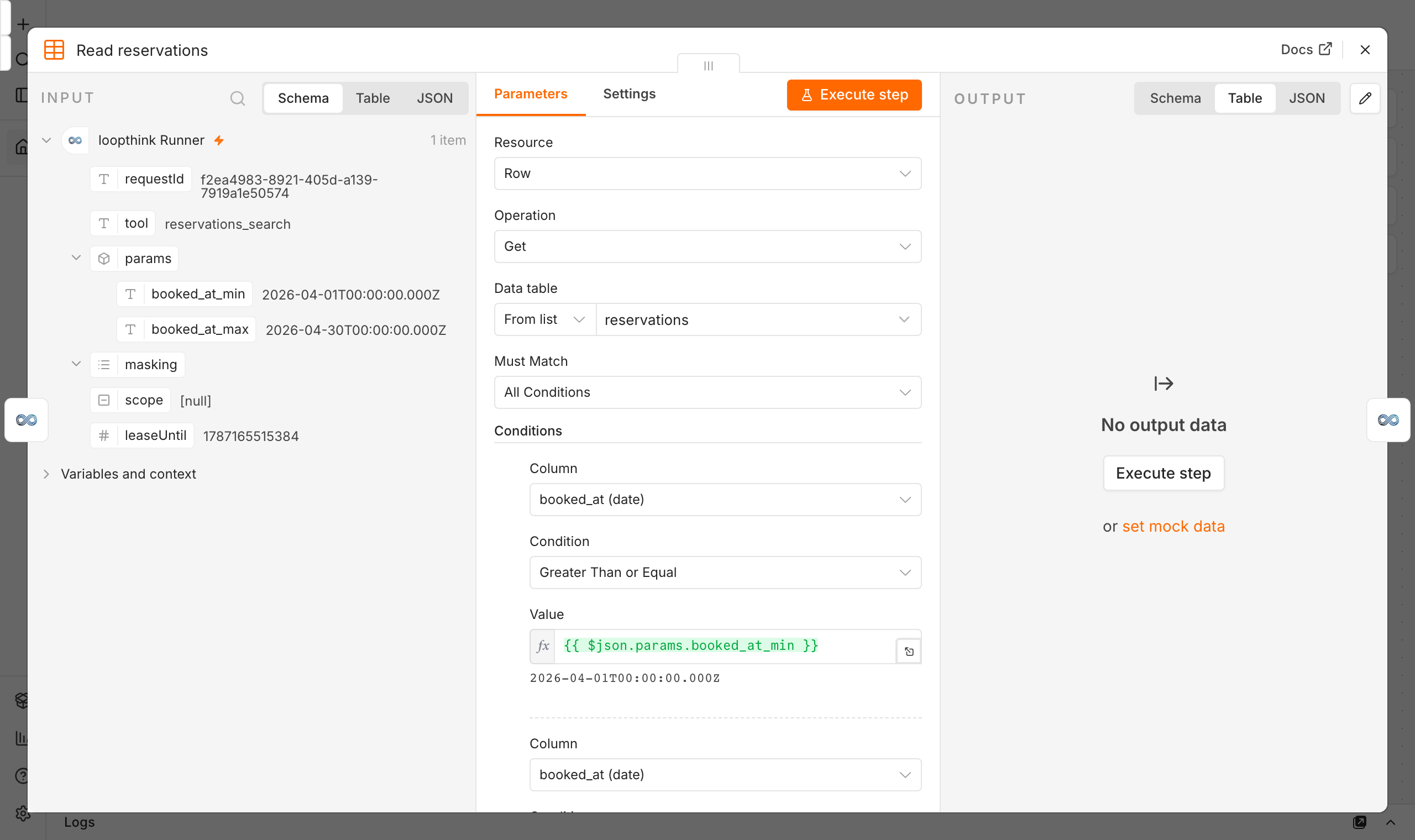
    The Data Table node wants its conditions decided up front, so every row exists on every call, whether or not the model filled it. Loopthink sends a ready value for each one under $json.params, under the name you gave the parameter. Pick the column, pick the comparison once, and read the value.

    Two conditions on booked_at reading $json.params.booked_at_min and $json.params.booked_at_max (n8n and Loopthink, for ChatGPT)
    One condition row per parameter, each reading the value under its own name.

What the model actually asked for

“Which reservations were booked in April 2026?” arrives at the workflow like this, with the person's name and role already checked on the way in.

{
  "tool": "reservations_search",
  "params": {
    "booked_at_min": "2026-04-01T00:00:00.000Z",
    "booked_at_max": "2026-04-30T00:00:00.000Z"
  }
}
The same shape, other sources

A data table is only the easiest example.

A Postgres database wired into n8n

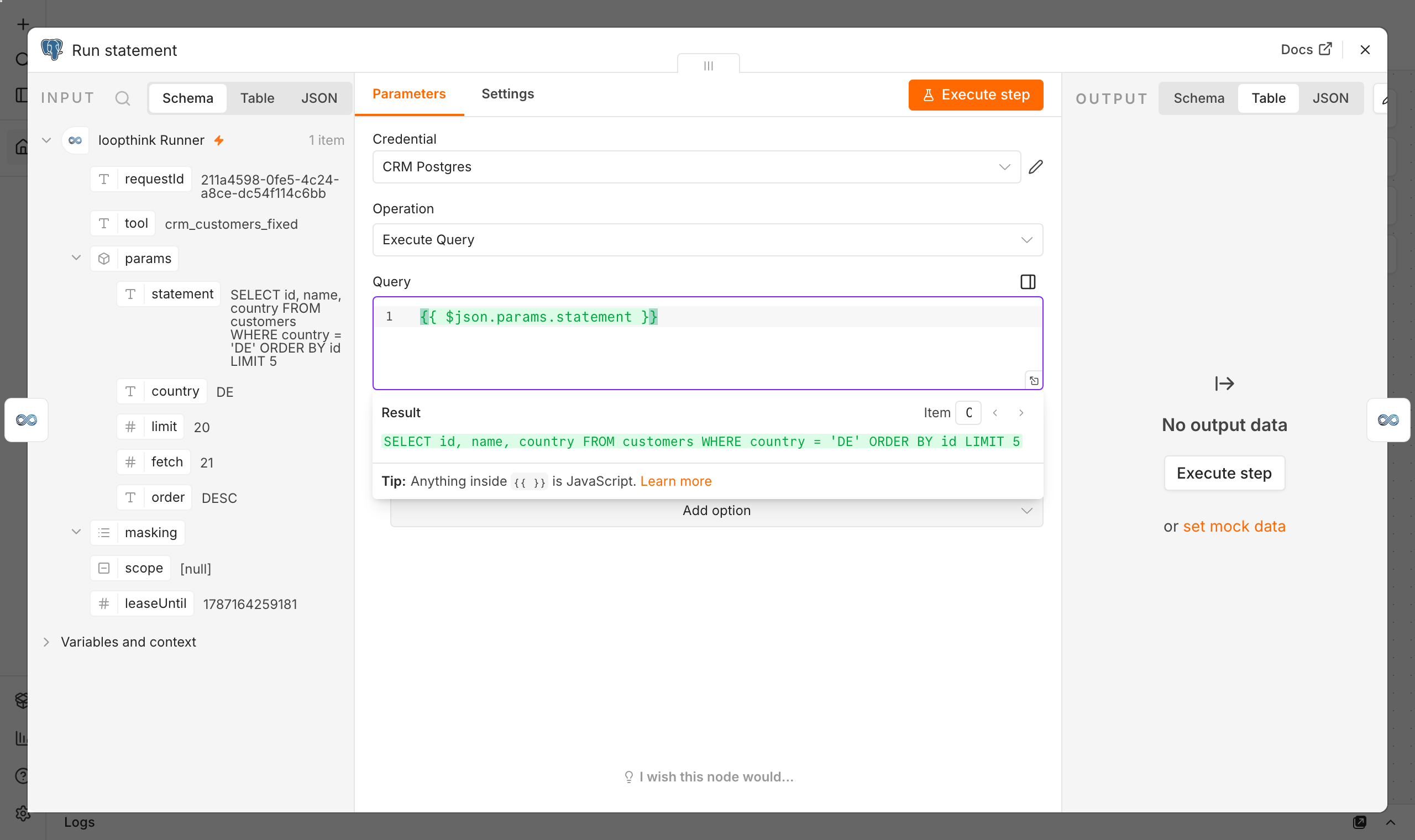
Swap the Data Table node for a Postgres node. The connection already exists in your n8n, with its own credential, and it stays there. You can let the workflow build the query from $json.params, or write the statement in Loopthink as a fixed value, a parameter the model never sees and cannot replace:

SELECT id, guest, total
FROM reservations
WHERE country = :country
ORDER BY booked_at DESC
LIMIT 50

The :country is filled from what the model passed, escaped by declared type before it leaves us, so the statement arrives ready to run. The database password is never anywhere near us.

A Postgres node whose Query field reads $json.params.statement, with the resolved SQL shown below it (n8n and Loopthink, for ChatGPT)
The field holds the expression; n8n shows underneath, in green, what it resolves to for this call.

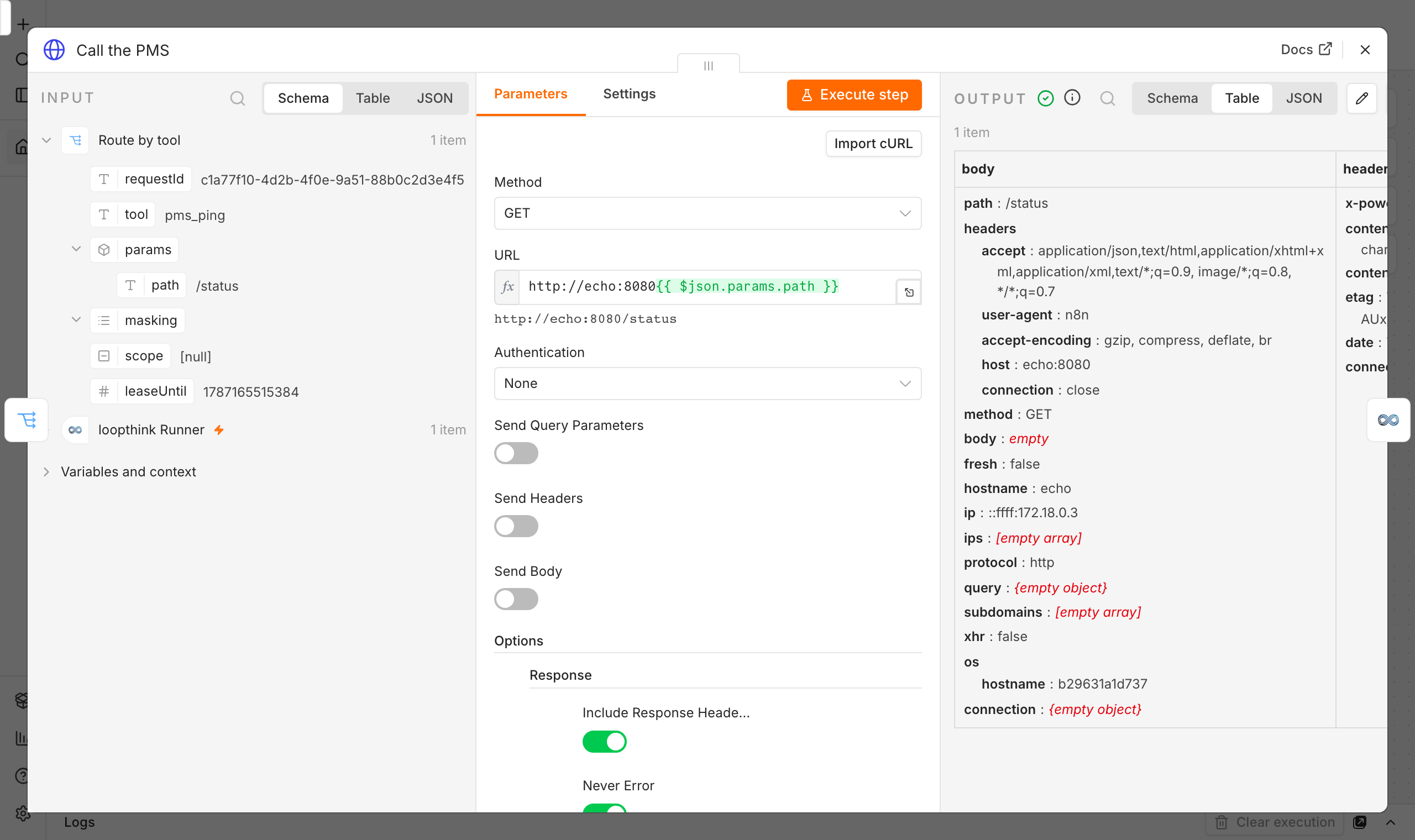
An internal API, called from n8n

Same idea, one node further. Put the path in the tool as a fixed value and let an HTTP Request node in your workflow make the call:

URL: http://pms.internal:8080{{ $json.params.path }}

Authentication is the HTTP node’s own n8n credential. Loopthink says what to reach, never what to reach it with, and the host name is one that only resolves inside your network anyway.

An HTTP Request node whose URL reads $json.params.path, with the resolved address shown below it (n8n and Loopthink, for ChatGPT)
Same again: the expression above, the address it resolves to below.

What never leaves your network

  • Credentials. Database passwords and API keys live in n8n, on the node that uses them.
  • Addresses. An internal host name is not something we store; a tool carries a path, your runner resolves it.
  • Unmasked data. Masking rules travel with each call and are applied in your network, before anything is sent.
  • Reachability. The runner opens the connection. There is no inbound port to expose and none to secure.

Results do pass through the platform on their way back to ChatGPT, masked, and are deleted on delivery. That is the trade for a runner that needs no inbound connection.

The full n8n integration page →

What you get

Four checks between ChatGPT and n8n.

  1. 01

    Identify

    OIDC/SSO against your own IdP, including Microsoft Entra. The call runs as the person who made it, never as a shared service account.

  2. 02

    Authorize

    Per-role, per-tool, read or write. Anything not explicitly granted never shows up in the tool list in the first place.

  3. 03

    Mask

    Field-level masking and pseudonymization applied on your side, before the result travels. The model never sees the raw field. Composio, AnythingMCP and both provider tunnels have no field-level masking at all.

  4. 04

    Log

    Who asked, which tool, which records, which fields were masked. One audit trail across every AI client, exportable for review.

Use cases

What people actually ask ChatGPT about n8n.

  • Front desk

    “Which reservations were booked in April for the Berlin property?”

  • Revenue

    “Booked revenue this month versus last month, by property?”

  • Management

    “How many nights are booked for next weekend across all properties?”

Each question runs as the person who asked it, with that person's role. A Revenue colleague asking the Front desk question gets the tools their own role allows, not an error, not more.

Compare

Four ways to put n8n into ChatGPT.

Native n8n connectorBuild it yourselfEnterprise gateways1Loopthink
Per-user identityOne personal login, all its rightsOnly if you build itYesYes, every call runs as the person who asked
Tool-level rolesNoYour codeYesYes, write off by default
Field maskingNoYour codeNot documentedYes, before the model sees the data
Published priceIncluded in your n8n planYour engineers' timeContact salesFree, Team from €99
EU companyYesWhatever you areMostly USYes, Germany

Native n8n connector: n8n's MCP Server Trigger with one bearer token per workflow, or the instance-level MCP server signed in as one user. An inbound URL on your n8n, and the same rights for everyone who holds the token.

1 MintMCP, MCP Manager, Pomerium

Coming from one of them? Composio alternative · MintMCP alternative · MCP Manager alternative · AnythingMCP alternative

FAQ

Before you connect.

Does every team member need their own n8n account?
No. Your n8n is the only thing that talks to your systems, and it keeps its own credentials. Your people sign in to Loopthink with their own identity, and every call to a workflow is logged under their name. n8n seats stay where they are today.
Who has to add the connector in ChatGPT?
One person with the right to add connectors in your ChatGPT workspace, once. After that every team member enables it for themselves. Nobody pastes a key, nobody edits a config file.
Where does the n8n key live?
There is none. The runner credential in n8n, four values shown once, lets your n8n pull calls from Loopthink. Database passwords and API keys stay on the n8n nodes that use them, and nothing reaches Loopthink or ChatGPT.
Can somebody write to n8n from the chat?
Not unless you switch it on. Write actions are a separate row in the permission matrix and are off for every role by default. If a role needs one write tool, you grant that one tool to that one role.
What does the model see?
The result of the tool call, after masking. Fields you mark as personal, such as emails, names or card details, are masked before the answer travels to ChatGPT. The model gets the numbers, not the people.
Is there an audit trail?
Yes. Who asked, which tool, which parameters, which fields were masked, when. One log across every client your team uses, exportable for review.
What does it cost?
Free for one person and your own MCP server, forever. Team starts at €99 per month and covers the built connector, per-person identity, roles, masking and audit for the whole team. Prices are on the pricing page, no call needed.
We already run our own MCP server for n8n. Does it still work?
Yes. Point it at Loopthink and it inherits the same login, roles, masking and audit. Nothing on the server has to change.
n8n in ChatGPT, with rules.

One key in Loopthink, one login per person, one matrix that decides who may do what.

Free for your own server · Team from €99 · EU-hosted