PostHog in Claude, ChatGPT and any MCP client. For your whole team.
Insights and trends, events and persons, feature flags, session recordings, error tracking. One token in Loopthink, one login per person, roles per tool and an audit entry for every call.
Free for 2 connectors, no card · Pro €19 · EU-hosted · 19 read tools, 2 write tools off by default
“Weekly active users for the last eight weeks, counted as distinct persons with a pageview.”
Last three weeks of the eight, distinct persons with a pageview:
| Week | WAU | Change | Pageviews |
|---|---|---|---|
| 6 Oct 2026 | 4,812 | +6.1 % | 61,340 |
| 13 Oct 2026 | 5,104 | +6.1 % | 65,920 |
| 20 Oct 2026 (to date) | 1,286 | 15,480 |
- read-only
- logged
One token in, the tools come out.
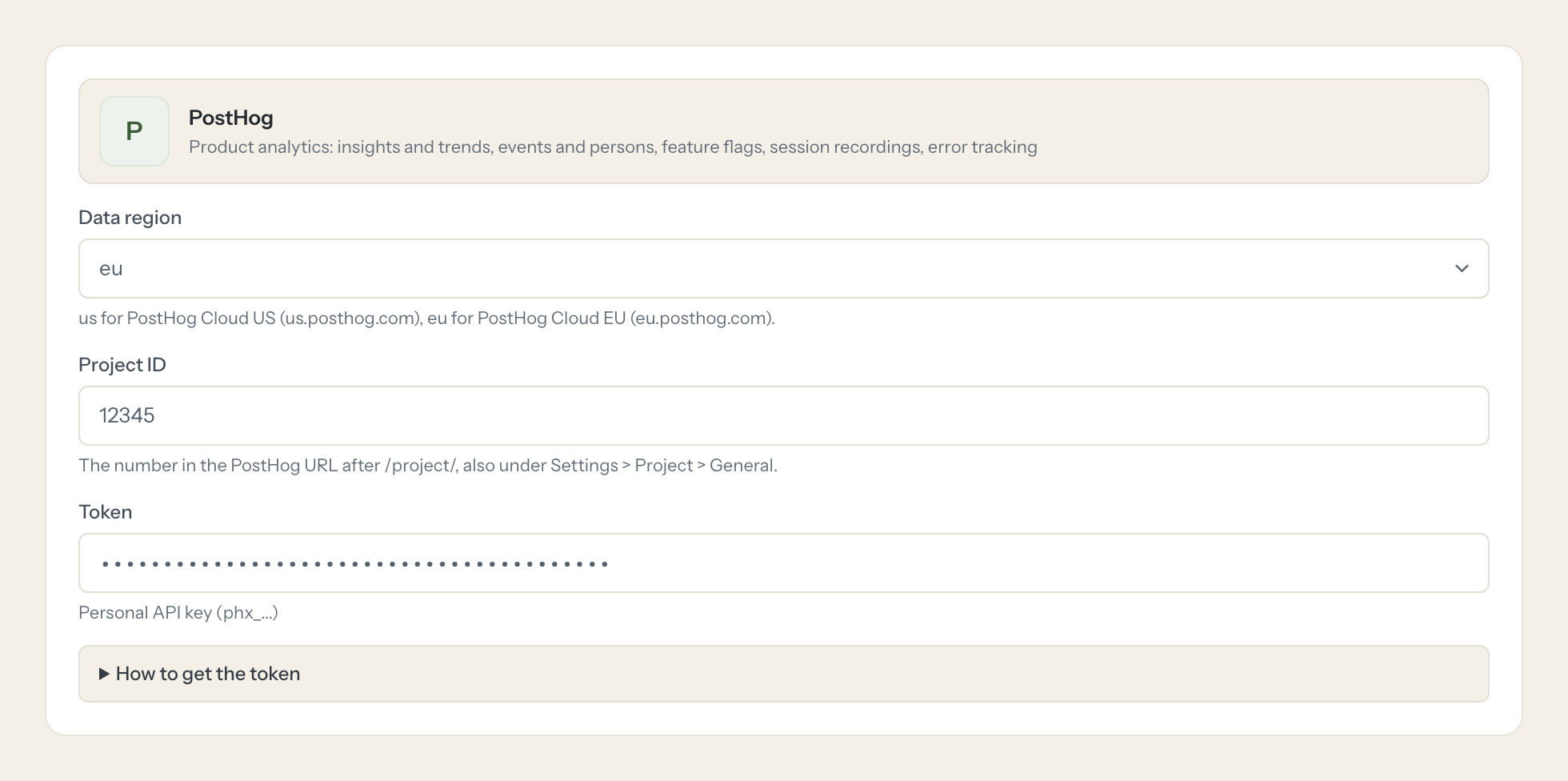
PostHog is where product usage lives: events and the persons behind them, saved insights and dashboards, feature flags with their rollouts, session recordings and error tracking. The questions are everyday ones, "how many people used the new export last week", "is the beta flag still on", but today they take an insight someone has to build or a HogQL query only one analyst can write.
With the PostHog connector, Product, Engineering and Support ask in Claude or ChatGPT and get the answer from the live project. Loopthink holds one personal API key, every person signs in with their own identity, and every call is logged under their name. The key never reaches the AI client.
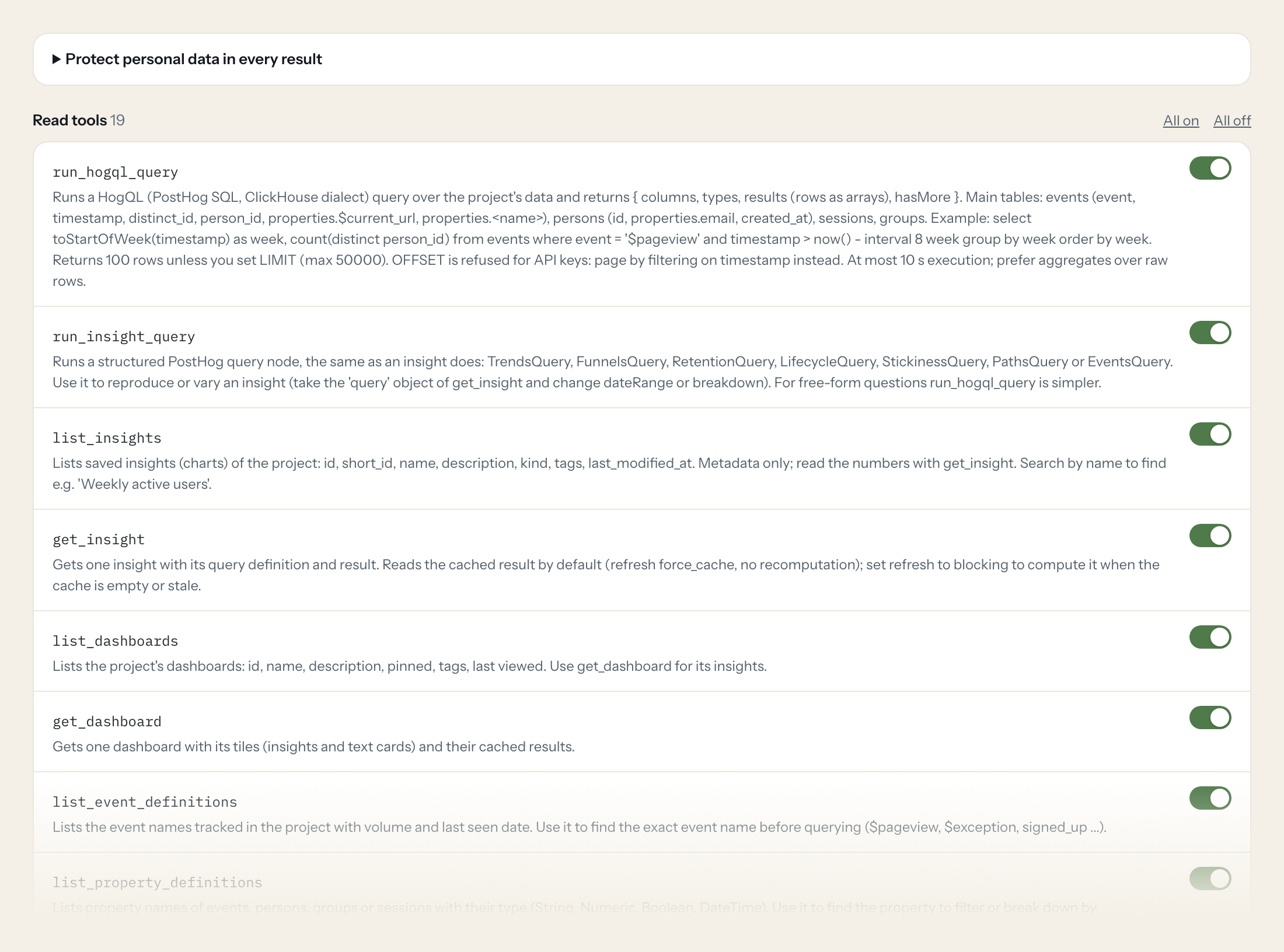
Nineteen read tools cover HogQL and insight queries, saved insights and dashboards, event and property definitions, persons and cohorts, feature flags and their status, session recordings, error tracking issues and annotations. The two write tools, enabling and disabling a feature flag, stay off until you switch them on for a role.
- Product
“Weekly active users for the last eight weeks, counted as distinct persons with a pageview.”
Answered by
run_hogql_query - Product
“Show me the numbers behind the saved insight 'Onboarding funnel' and tell me where the biggest drop is.”
Answered by
get_insight - Engineering
“Which feature flags are fully rolled out and have not changed in 30 days? Check 'new-billing-page' first.”
Answered by
get_feature_flag_status - Support
“Does the customer with email m.bauer@example.de have any session recordings from today with console errors?”
Answered by
list_session_recordings - Engineering
“List open error tracking issues sorted by affected users and tell me which ones first appeared this week.”
Answered by
query_error_tracking_issues - Engineering
“Turn off the flag 'checkout-v2' for everyone, the payment step is failing.”
Answered by
disable_feature_flag
What the PostHog connector can do.
| Tool | What it does | Access | Default |
|---|---|---|---|
| run_hogql_query | Runs a HogQL (PostHog SQL, ClickHouse dialect) query over the project's data and returns { columns, types, results (rows as arrays), hasMore }. Main tables: events (event, times… | Read | On |
| run_insight_query | Runs a structured PostHog query node, the same as an insight does: TrendsQuery, FunnelsQuery, RetentionQuery, LifecycleQuery, StickinessQuery, PathsQuery or EventsQuery. Use it… | Read | On |
| list_insights | Lists saved insights (charts) of the project: id, short_id, name, description, kind, tags, last_modified_at. Metadata only; read the numbers with get_insight. | Read | On |
| get_insight | Gets one insight with its query definition and result. Reads the cached result by default (refresh force_cache, no recomputation); set refresh to blocking to compute it when the… | Read | On |
| list_dashboards | Lists the project's dashboards: id, name, description, pinned, tags, last viewed. Use get_dashboard for its insights. | Read | On |
| get_dashboard | Gets one dashboard with its tiles (insights and text cards) and their cached results. | Read | On |
| list_event_definitions | Lists the event names tracked in the project with volume and last seen date. Use it to find the exact event name before querying ($pageview, $exception, signed_up ...). | Read | On |
| list_property_definitions | Lists property names of events, persons, groups or sessions with their type (String, Numeric, Boolean, DateTime). Use it to find the property to filter or break down by. | Read | On |
| list_persons | Lists or finds persons (identified users): id, uuid, name, distinct_ids, properties (email, plan ...), created_at, last_seen_at. search matches email, name, person id or distinc… | Read | On |
| get_person | Gets one person with all properties and distinct ids. | Read | On |
| list_feature_flags | Lists feature flags: id, key, name, active (whether it is being served), filters (release conditions; rollout percentages sit in filters.groups[].rollout_percentage, variants in… | Read | On |
| get_feature_flag | Gets one feature flag with its full release conditions, variants and linked experiments. | Read | On |
| get_feature_flag_status | Tells whether a flag is still in use: status (ACTIVE, STALE, DELETED, UNKNOWN) and the reason, e.g. fully rolled out and unchanged for 30 days. | Read | On |
| list_session_recordings | Lists session recordings, newest first: id, start_time, recording_duration, active_seconds, click_count, console_error_count, start_url, person. Filter by date or person. | Read | On |
| get_session_recording | Gets the metadata of one session recording: duration, active time, clicks, console errors, start URL, person. | Read | On |
| query_error_tracking_issues | Lists error tracking issues (grouped exceptions) with occurrences, affected users, first and last seen. Filter by status and text. | Read | On |
| get_error_tracking_issue | Gets one error tracking issue: name, description, status, first_seen, assignee, linked external issues. | Read | On |
| list_cohorts | Lists cohorts (saved groups of persons): id, name, description, count, static or dynamic. | Read | On |
| list_annotations | Lists annotations (notes on charts such as releases or campaigns) with date and text. Useful to explain a change in a trend. | Read | On |
| enable_feature_flag | WRITE: Turns a feature flag on (active = true) with its existing release conditions. Refused for archived flags. | Write | Off |
| disable_feature_flag | WRITE: Turns a feature flag off (active = false) for every user. PostHog refuses when other active flags depend on it. | Write | Off |
Write tools are off for every role until you switch them on, one tool for one role. The names are what the model sees; it also gets the full parameter description of each tool.
Getting the PostHog token.
Five minutes, once. Nobody on your team ever sees it.
- 1
In PostHog open Settings > Account > Personal API keys and click 'Create personal API key'. Do not use the MCP Server preset: it grants write scopes.
- 2
Limit the key's access to the one project Loopthink should read.
- 3
Select the read scopes below and nothing with write (feature_flag:write only if you want the enable/disable tools).
- 4
Create the key and copy it; it is shown once. Paste it here with the data region and the project ID.
- 5
In Loopthink, add PostHog from the catalog and paste the token. It also asks for data region and project id. Your team sees the tools a minute later.
A personal API key acts as the user who created it; a dedicated PostHog member keeps it alive when people leave. Limits per key: 240 analytics requests per minute, 2400 queries per hour, 3 concurrent queries.
What we suggest masking in PostHog.
Persons and events carry the user behind them: email, name, distinct ids, IP address and the URL they were on. The suggested fields mask all of that and keep event names, timestamps, counts, flag definitions and recording metadata, which is what a usage question needs. Product sees that 412 persons reached the pricing page without seeing who they are.
- properties.email
- name
- distinct_id
- distinct_ids
- properties.$ip
- $ip
- person
- start_url
- properties.$current_url
- assignee
What PostHog's own MCP server does not give you.
- One login per person in any MCP client: the Loopthink audit shows who asked, not one shared API key.
- Tools per role: Support reads recordings and errors, nobody outside Engineering can flip a feature flag.
- Masking of emails, distinct ids, IP addresses and URLs in query results before the answer leaves the EU.
- Write tools off by default, switchable per tool and role.
- The same server in Claude, ChatGPT and Langdock, governed once.
PostHog and Loopthink
- Which scopes does the personal API key need?
- Only read scopes: query:read, insight:read, dashboard:read, event_definition:read, property_definition:read, person:read, cohort:read, annotation:read, feature_flag:read, session_recording:read and error_tracking:read. Add feature_flag:write only if a role should use enable_feature_flag or disable_feature_flag. Do not pick the MCP Server preset when creating the key, it grants write scopes.
- Our project is on PostHog Cloud EU. What do we enter?
- Set the data region to eu and enter the project ID from the URL after /project/. The key is scoped to the one project you selected when creating it, so limit it to the project Loopthink should read.
- Are there rate limits we should know about?
- Per key PostHog allows 240 analytics requests per minute, 2400 queries per hour and 3 concurrent queries. A HogQL query runs for at most 10 seconds and returns 100 rows unless you set a LIMIT, so ask for aggregates rather than raw events. The key acts as the member who created it; a dedicated PostHog member keeps it alive when people leave.
- Does every team member need their own PostHog account?
- No. Loopthink holds one key or token for PostHog. Your people sign in to Loopthink with their own identity, and every call to PostHog is logged under their name. Seats in PostHog stay where they are today.
- Where does the PostHog key live?
- In Loopthink, encrypted, in the EU. It never reaches the AI client and never reaches the people using the connector. Rotate it in PostHog whenever you like and paste the new one once.
- Can somebody write to PostHog from the chat?
- Not unless you switch it on. Write actions are a separate row in the permission matrix and are off for every role by default. If a role needs one write tool, you grant that one tool to that one role.
- What does the model see?
- The result of the tool call, after masking. Fields you mark as personal, such as emails, names or card details, are masked before the answer travels to the AI client. The model gets the numbers, not the people.
- What does it cost?
- Free for one person and two connectors, no card. Pro is €19 a month for up to five people and every connector on the site, with roles, field masking and a 30-day audit. Team is €49 for ten people and adds your own REST APIs and SQL databases, your own domain and your own identity provider. No call needed.
Stuck, or a tool you need is missing? A person who knows this connector answers within one working day.


