Salesforce in Claude, ChatGPT and any MCP client. For your whole team.
Search and read the sObjects you pick, plus SOQL. One token in Loopthink, one login per person, roles per tool and an audit entry for every call.
Free for 2 connectors, no card · Pro €19 · EU-hosted · 2 read tools, 3 write tools off by default
“Open opportunities over 50,000 with a close date this quarter and no activity in 14 days.”
Three opportunities match, sorted by amount:
| Opportunity | Amount | Close date | Last activity |
|---|---|---|---|
| Alpen Logistik, fleet platform | 148,000 € | 18 Dec 2026 | 29 Sep 2026 |
| Müller & Söhne GmbH, ERP add-on | 86,500 € | 27 Nov 2026 | 02 Oct 2026 |
| Huber AG, support renewal | 54,200 € | 30 Nov 2026 | 05 Oct 2026 |
- read-only
- logged
One token in, the tools come out.
Salesforce holds the accounts, contacts, opportunities, cases and whatever custom objects your org has grown over the years. The data is all there; the report that answers today's question usually is not, and building one is a request to the Salesforce admin.
With the Salesforce connector, Sales, Service and Management ask in Claude or ChatGPT and get the answer from the live org. Loopthink signs in as an integration user with client credentials, every person signs in with their own identity, and every call is logged under their name.
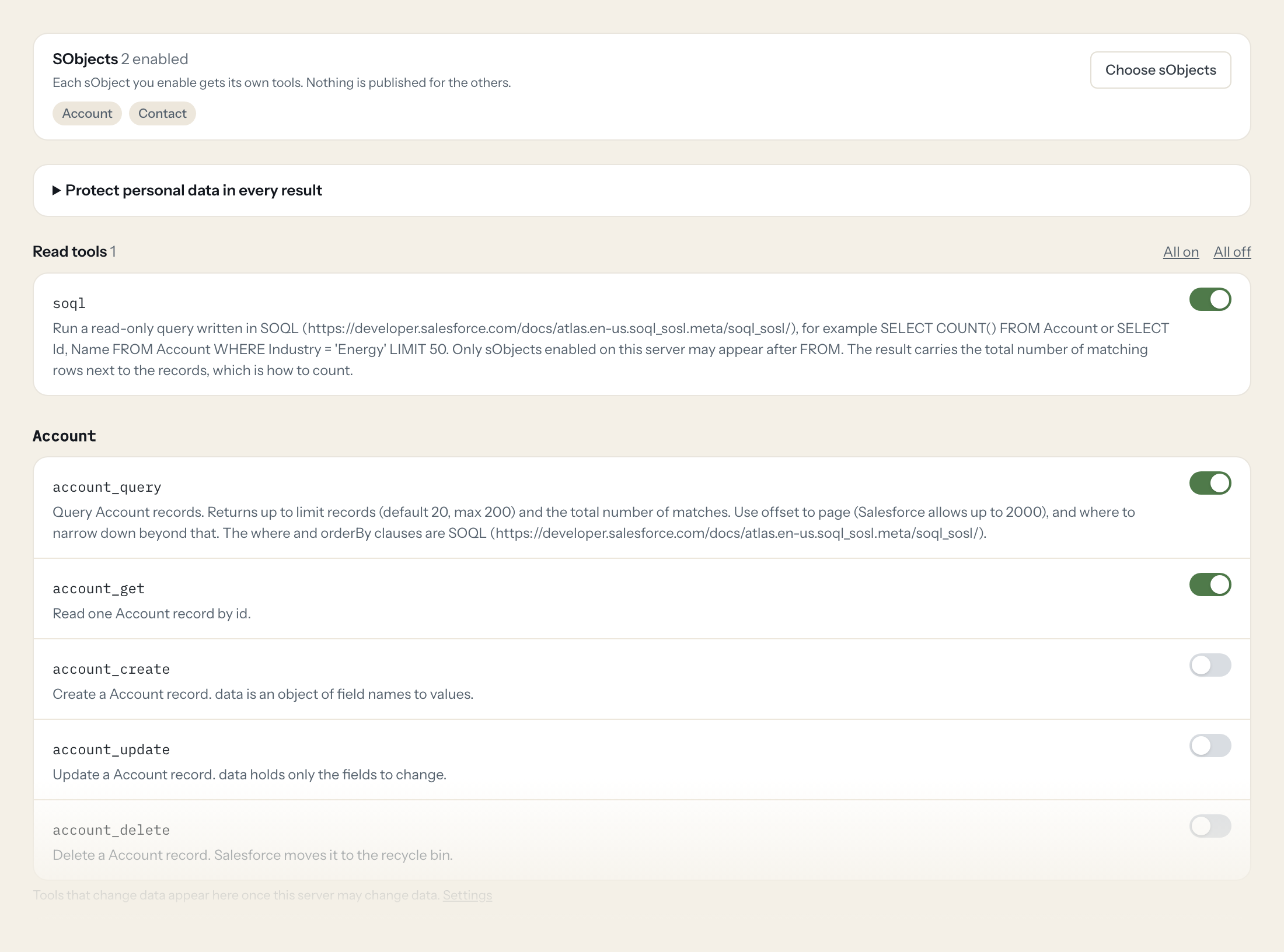
You pick the sObjects the server exposes, standard or custom. Each one gets a query tool with SOQL-style filters and a get tool. Create, update and delete exist per object and stay off until you switch them on for a role that needs them.
- Sales
“Open opportunities over 50,000 with a close date this quarter and no activity in 14 days.”
Answered by
Opportunity_query - Sales
“Everything on the Acme account before my call: contacts, open opportunities, open cases.”
Answered by
Account_get - Service
“Escalated cases older than three days, by owner.”
Answered by
Case_query - Management
“Pipeline by stage for the EMEA region, with the five biggest deals per stage.”
Answered by
Opportunity_query - Marketing
“Leads created from the webinar campaign in the last 30 days, by status.”
Answered by
Lead_query - Sales ops
“Move opportunity 006... to stage "Negotiation" and set the close date to the 30th.”
Answered by
Opportunity_update
What the Salesforce connector can do.
Salesforce is organised by sObject. You enable the sObjects the server exposes, and each one gets the tools below, named after it. Shown here for Account.
| Tool | What it does | Access | Default |
|---|---|---|---|
| listSobjects | Lists the sObjects enabled on this server, with what each contains. Call this first, then use the tools named after an sObject. | Read | On |
| Account_query | Query Account records. Returns up to limit records (default 20, max 200) and the total number of matches. | Read | On |
| Account_get | Read one Account record by id. | Read | On |
| Account_create | Create a Account record. data is an object of field names to values. | Write | Off |
| Account_update | Update a Account record. data holds only the fields to change. | Write | Off |
| Account_delete | Delete a Account record. Salesforce moves it to the recycle bin. | Write | Off |
Write tools are off for every role until you switch them on, one tool for one role. The names are what the model sees; it also gets the full parameter description of each tool.
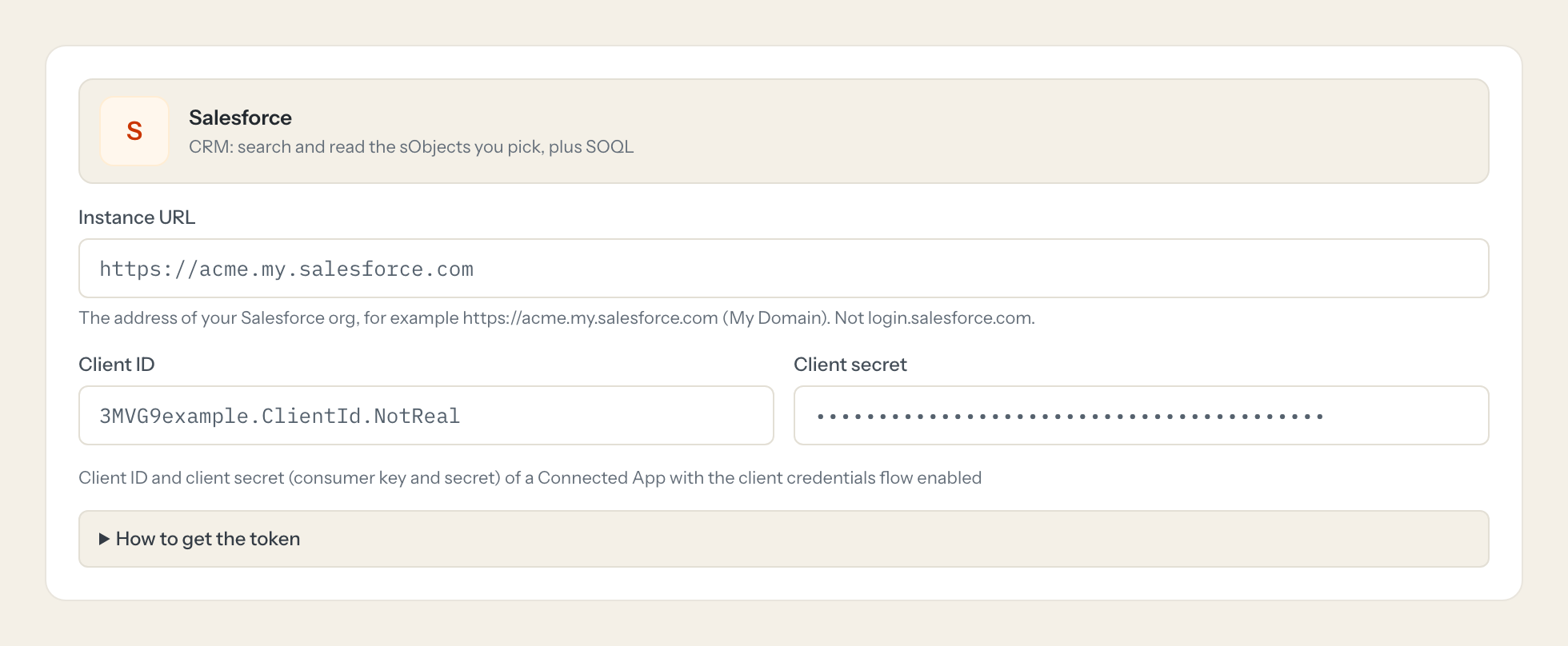
Getting the Salesforce token.
Five minutes, once. Nobody on your team ever sees it.
- 1
In Salesforce Setup open App Manager and create a Connected App (or External Client App) with OAuth enabled.
- 2
Tick Enable Client Credentials Flow and give the app the scope api (Manage user data via APIs).
- 3
On the app's policies page set Run As to a dedicated integration user with read access to the objects you want to expose.
- 4
Copy the Consumer Key and Consumer Secret and enter them here with your instance URL.
- 5
In Loopthink, add Salesforce from the catalog and paste the client id and secret. It also asks for instance url. Your team sees the tools a minute later.
The integration user's permissions decide what the server can read and change. Create it with the least access that works.
What we suggest masking in Salesforce.
Contacts and leads are people: email, phone, mobile, first and last name, mailing and billing street, birthdate. The suggested fields mask those and keep amounts, stages, dates, owners and ids, which is what a pipeline or case question needs. Search still works, since masking replaces values in the answer, not in the query.
- Phone
- MobilePhone
- FirstName
- LastName
- Name
- MailingStreet
- BillingStreet
- Birthdate
What Salesforce's own MCP server does not give you.
- One login per person in any MCP client: the Loopthink audit shows who asked, not which integration user ran the query.
- sObjects and tools per role: Service reads cases, Sales reads opportunities, nobody reads payroll objects.
- Masking of personal fields before the answer leaves the EU.
- Write tools off by default, switchable per object, per tool and per role.
- The same server in Claude, ChatGPT and Langdock, governed once.
Salesforce and Loopthink
- Which Salesforce setup does the connector need?
- A connected app with the client credentials flow enabled and an integration user it runs as, plus the api scope. The integration user's profile and permission sets decide what the server can read and change, so give it the least access that works.
- Can we expose custom objects?
- Yes. Any sObject the integration user can see can be enabled, custom objects included. Each enabled object gets the same query and get tools.
- Does the AI write SOQL?
- The query tools take filters that the connector turns into SOQL, with a guard against anything that is not a read. The model does not get a free SOQL console.
- Does every team member need their own Salesforce account?
- No. Loopthink holds one key or token for Salesforce. Your people sign in to Loopthink with their own identity, and every call to Salesforce is logged under their name. Seats in Salesforce stay where they are today.
- Where does the Salesforce key live?
- In Loopthink, encrypted, in the EU. It never reaches the AI client and never reaches the people using the connector. Rotate it in Salesforce whenever you like and paste the new one once.
- Can somebody write to Salesforce from the chat?
- Not unless you switch it on. Write actions are a separate row in the permission matrix and are off for every role by default. If a role needs one write tool, you grant that one tool to that one role.
- What does the model see?
- The result of the tool call, after masking. Fields you mark as personal, such as emails, names or card details, are masked before the answer travels to the AI client. The model gets the numbers, not the people.
- What does it cost?
- Free for one person and two connectors, no card. Pro is €19 a month for up to five people and every connector on the site, with roles, field masking and a 30-day audit. Team is €49 for ten people and adds your own REST APIs and SQL databases, your own domain and your own identity provider. No call needed.
Stuck, or a tool you need is missing? A person who knows this connector answers within one working day.

