Supabase in Claude, ChatGPT and any MCP client. For your whole team.
Tables and schema, read-only SQL, logs, advisors, edge functions of one project. One token in Loopthink, one login per person, roles per tool and an audit entry for every call.
Free for 2 connectors, no card · Pro €19 · EU-hosted · 15 read tools
“How many rows were inserted into public.orders per day over the last 14 days?”
Inserts per day into public.orders, the last three days of the 14:
| Day | Rows inserted | Change vs. prior day |
|---|---|---|
| 19 Oct 2026 | 1,284 | +96 |
| 20 Oct 2026 | 1,402 | +118 |
| 21 Oct 2026 | 1,117 | −285 |
- read-only
- logged
One token in, the tools come out.
Supabase is where the product's data and its plumbing live: the Postgres tables and views, the migrations that shaped them, the logs of the API gateway and the database, Edge Functions, storage buckets and backups. The questions are everyday ones, "how many orders came in yesterday", "why did the sign-up function error at 09:40", but today they take the SQL editor, the logs explorer and someone who knows both.
With the Supabase connector, Engineering, Product and Support ask in Claude or ChatGPT and get the answer from the live project. Loopthink holds one scoped personal access token, every person signs in with their own identity, and every call is logged under their name. The token never reaches the AI client.
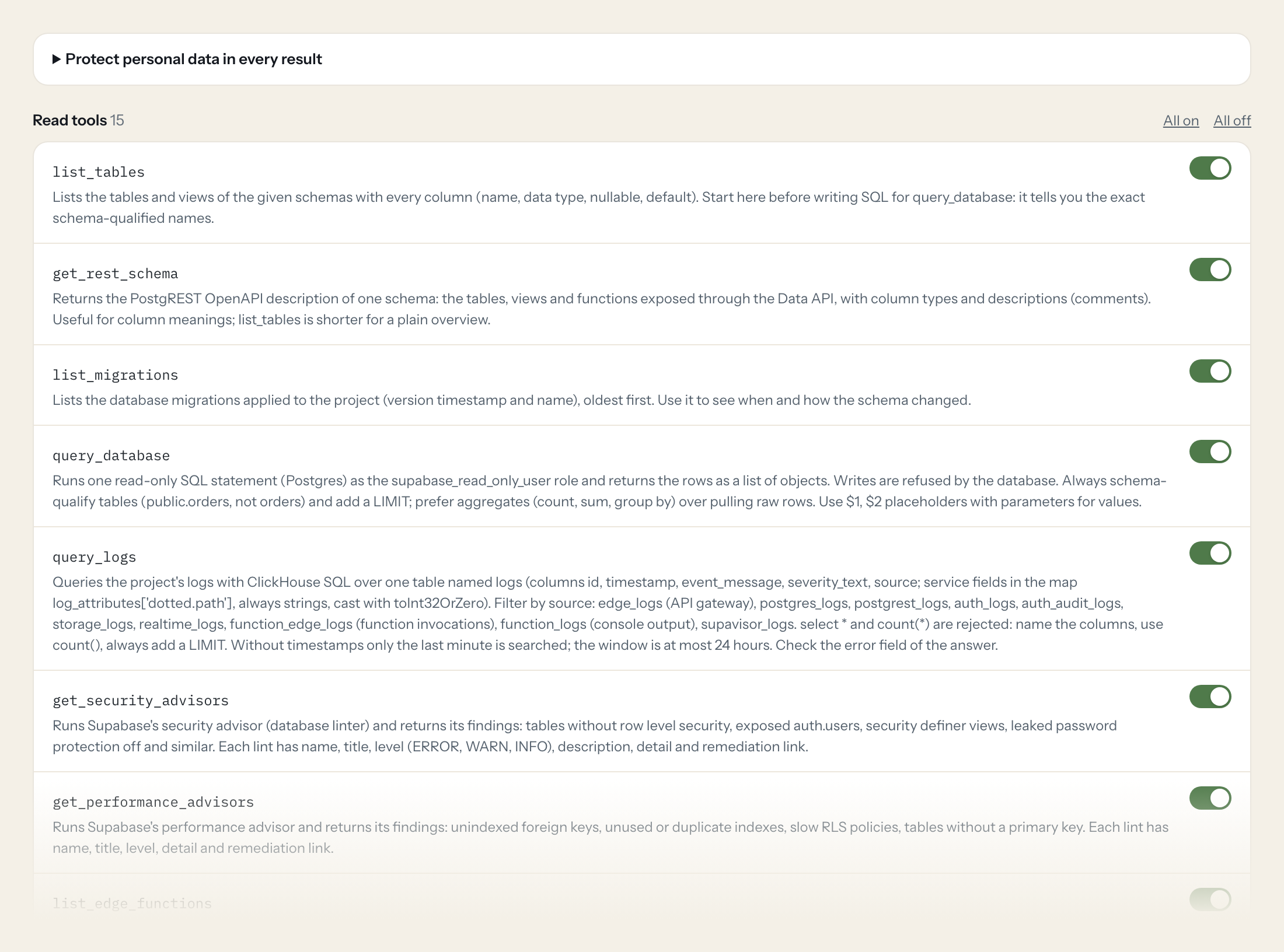
The connector is read-only: 15 tools for tables and the REST schema, migrations, read-only SQL, log queries, security and performance advisors, Edge Functions with their stats, service health, API usage, storage buckets, backups and branches. There are no write tools, and the database itself refuses writes from the read-only role.
- Product
“How many rows were inserted into public.orders per day over the last 14 days?”
Answered by
query_database - Engineering
“Show me all edge_logs with status 500 from the last two hours, grouped by path.”
Answered by
query_logs - Engineering
“Which tables in the public schema have no row level security enabled?”
Answered by
get_security_advisors - Support
“What columns does public.subscriptions have, and which of them can be null?”
Answered by
list_tables - Engineering
“How many invocations and errors did the Edge Function 'send-invoice' have this week?”
Answered by
get_edge_function_stats - Engineering
“Are all project services healthy right now, and when was the last backup?”
Answered by
get_service_health
What the Supabase connector can do.
| Tool | What it does | Access | Default |
|---|---|---|---|
| list_tables | Lists the tables and views of the given schemas with every column (name, data type, nullable, default). Start here before writing SQL for query_database: it tells you the exact… | Read | On |
| get_rest_schema | Returns the PostgREST OpenAPI description of one schema: the tables, views and functions exposed through the Data API, with column types and descriptions (comments). Useful for… | Read | On |
| list_migrations | Lists the database migrations applied to the project (version timestamp and name), oldest first. Use it to see when and how the schema changed. | Read | On |
| query_database | Runs one read-only SQL statement (Postgres) as the supabase_read_only_user role and returns the rows as a list of objects. Writes are refused by the database. | Read | On |
| query_logs | Queries the project's logs with ClickHouse SQL over one table named logs (columns id, timestamp, event_message, severity_text, source; service fields in the map log_attributes['… | Read | On |
| get_security_advisors | Runs Supabase's security advisor (database linter) and returns its findings: tables without row level security, exposed auth.users, security definer views, leaked password prote… | Read | On |
| get_performance_advisors | Runs Supabase's performance advisor and returns its findings: unindexed foreign keys, unused or duplicate indexes, slow RLS policies, tables without a primary key. Each lint has… | Read | On |
| list_edge_functions | Lists the project's Edge Functions: slug, name, status (ACTIVE, REMOVED, THROTTLED), version, verify_jwt, created_at and updated_at (epoch milliseconds). | Read | On |
| get_edge_function | Gets one Edge Function by slug: status, version, entrypoint, import map, whether it verifies JWTs, last update. | Read | On |
| get_edge_function_stats | Returns invocation statistics of one Edge Function over a time interval: request counts, errors and execution time series. Needs the function id (not the slug) from list_edge_fu… | Read | On |
| get_service_health | Checks the health of the project's services. Each entry has name and status COMING_UP, ACTIVE_HEALTHY or UNHEALTHY, plus error details. | Read | On |
| get_api_usage | Returns request counts over time for the project's REST, auth, storage and realtime APIs. Use it for traffic trends ('sign-ups this week' needs query_database on auth tables ins… | Read | On |
| list_storage_buckets | Lists the project's storage buckets with name, whether they are public, and creation dates. | Read | On |
| list_backups | Lists the project's database backups (status, physical or logical, inserted_at) and whether point-in-time recovery is enabled. | Read | On |
| list_branches | Lists the project's preview and persistent branches: name, git branch, pull request number, status, default flag. | Read | On |
Write tools are off for every role until you switch them on, one tool for one role. The names are what the model sees; it also gets the full parameter description of each tool.
Getting the Supabase token.
Five minutes, once. Nobody on your team ever sees it.
- 1
In the Supabase Dashboard open Account > Access Tokens (supabase.com/dashboard/account/tokens) and click 'Generate new token'. Do not use 'Create legacy token': a legacy token reaches every project of the account with full rights.
- 2
Resources: select only the one project Loopthink should read.
- 3
Permissions: set the permissions below to Read and leave everything else at No access. Never grant Read-write.
- 4
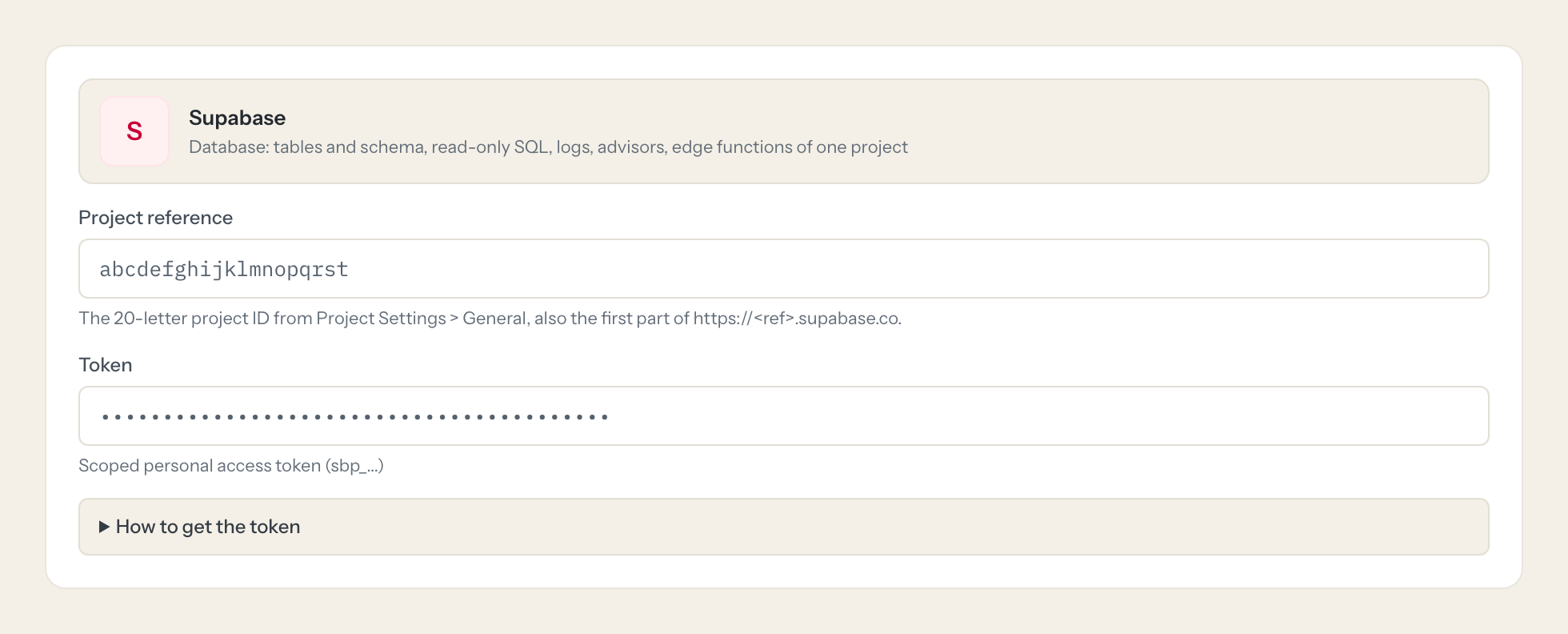
Choose an expiry (at most one year), generate the token and copy it; it is shown once. Paste it here together with the project reference.
- 5
In Loopthink, add Supabase from the catalog and paste the token. It also asks for project reference. Your team sees the tools a minute later.
A scoped token never exceeds the rights of the user who created it and stops working when that user leaves the organization; a dedicated member account with the Read-only role is the cleanest owner. Do not grant API Keys, API Key Secrets, Edge Function Secrets, Auth Config or Data API JWT Secret. The Management API allows 120 requests per minute per user and endpoint, logs and usage 30 per minute.
What we suggest masking in Supabase.
Query results can contain whatever your tables hold, and auth tables add email, phone and the raw user metadata; logs carry IP addresses, event messages and attributes that may repeat them. The suggested fields mask those and keep counts, timestamps, statuses, schema details and advisor findings, which is what a product or debugging question needs. Product sees that 318 orders came in on Monday without seeing the buyers' emails.
- phone
- raw_user_meta_data
- user_metadata
- ip
- event_message
- log_attributes
- metadata
What Supabase's own MCP server does not give you.
- One login per person in any MCP client: the Loopthink audit shows who asked, not one shared access token.
- Tools per role: Support reads the schema and health, only Engineering runs SQL and reads logs.
- Masking of emails, phone numbers, user metadata and IP addresses in rows and log lines before the answer leaves the EU.
- Write tools off by default, switchable per tool and role.
- The same server in Claude, ChatGPT and Langdock, governed once.
Supabase and Loopthink
- Scoped token or legacy token?
- Scoped. Generate a new token under Account > Access Tokens, select only the one project, set Database, Logs, Advisors, Edge Functions, Project Settings, Usage Analytics, Migrations, Backups and Storage to Read and leave everything else at No access. A legacy token reaches every project of the account with full rights. Do not grant API Keys, API Key Secrets, Edge Function Secrets, Auth Config or the Data API JWT Secret.
- Can the AI change data?
- No. query_database runs as the supabase_read_only_user role and the database refuses writes. The token is created with Read permissions only, and the connector has no write tools.
- Who should own the token, and how long does it live?
- A scoped token never exceeds the rights of the user who created it and stops working when that user leaves the organization, so a dedicated member with the Read-only role is the cleanest owner. Tokens expire after at most one year. The Management API allows 120 requests per minute per user and endpoint, logs and usage 30 per minute, and log queries cover a window of at most 24 hours.
- Does every team member need their own Supabase account?
- No. Loopthink holds one key or token for Supabase. Your people sign in to Loopthink with their own identity, and every call to Supabase is logged under their name. Seats in Supabase stay where they are today.
- Where does the Supabase key live?
- In Loopthink, encrypted, in the EU. It never reaches the AI client and never reaches the people using the connector. Rotate it in Supabase whenever you like and paste the new one once.
- Can somebody write to Supabase from the chat?
- Not unless you switch it on. Write actions are a separate row in the permission matrix and are off for every role by default. If a role needs one write tool, you grant that one tool to that one role.
- What does the model see?
- The result of the tool call, after masking. Fields you mark as personal, such as emails, names or card details, are masked before the answer travels to the AI client. The model gets the numbers, not the people.
- What does it cost?
- Free for one person and two connectors, no card. Pro is €19 a month for up to five people and every connector on the site, with roles, field masking and a 30-day audit. Team is €49 for ten people and adds your own REST APIs and SQL databases, your own domain and your own identity provider. No call needed.
Stuck, or a tool you need is missing? A person who knows this connector answers within one working day.


