Google Search Console · Google Ads · Google Analytics 4
Use Claude as your marketer. The missing connector to your ad data.
Three connectors, one Google sign-in. Claude reads your campaigns, your rankings and your funnel, changes what you allow it to change, and writes down every call it made.
Free for 2 connectors, no card · Pro €19 · EU-hosted
 Google Search ConsoleOn
 Google AdsOn
 Google Analytics 4On
“How did last week go?”
Good week on search, expensive week on ads. The short version:
Search Console
3,412+6 %
clicks. /pricing is back on page 1 after the title change.
Google Ads
€1,240CPA+18 %
spent, 23 conversions. “Competitor · Search” ate €611 for nothing.
GA4
8,900+4 %
sessions. Blog traffic up, but 1.2 % conversion on the new guide.
I paused the 4 keywords with zero conversions in 30 days, as you asked last week. That frees about €160 a week.
Google Ads · 4 changes · Logged
Three questions your team asks every Monday.
Today they take a CSV export, a pivot table and an afternoon. In Claude they take a sentence, because the numbers come out of your own accounts.
Google Search Console
“Which pages are losing clicks?”
Clicks, impressions, queries and positions for every property you tick. Google has no MCP server for Search Console at all.
Set it up in Claude →Google Ads
“Pause every keyword that didn't convert this month.”
Campaigns, spend and conversions across your accounts, and the changes you allow, each one with its before and after.
Set it up in Claude →Google Analytics 4
“Where do people drop off?”
Sessions, conversions and channels from your GA4 properties, reported against the same date range as the other two.
Set it up in Claude →
Works in Claude and in ChatGPT, and alongside the other 73 systems in the catalog.
Three steps. The third one is asking.
No cloud project, no developer token, no Python on anybody's laptop.
- 1
Sign in with Google
Once, with the account that already sees your ad accounts and properties. Tick what your team may reach.
- 2
Paste one URL into Claude
Settings, Connectors, Add custom connector. A name and a URL, and that is the whole form.
- 3
Ask
In the chat, in plain language. Every answer comes out of your accounts, and every call lands in the log.
The whole setup, start to finish, nothing cut.
It can change things. Only after you say so.
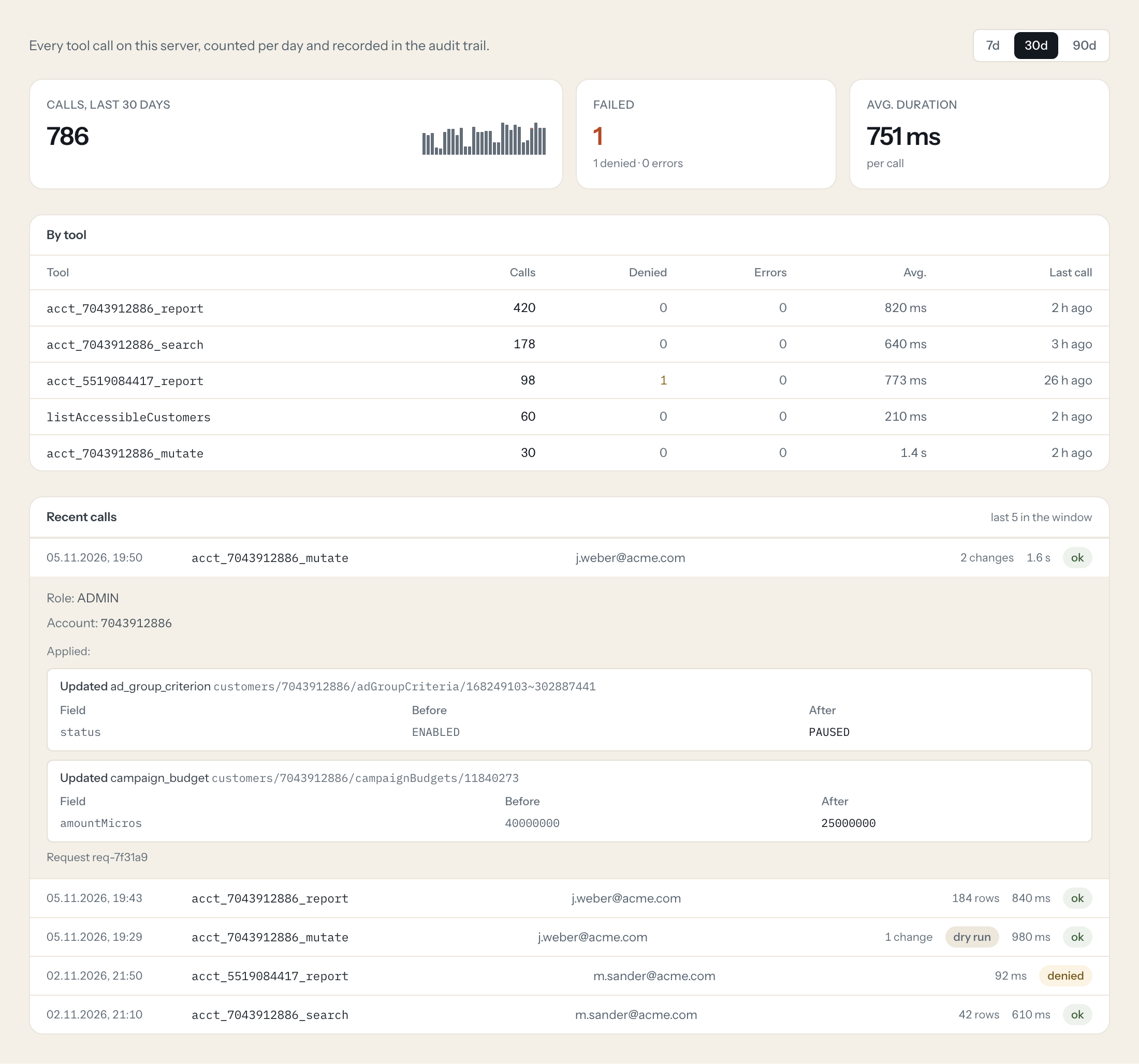
A connector that only reads is a report. A connector that writes without a trail is a liability. Loopthink ships read-only, and every change you do allow is recorded with its before and after.
Read-only out of the box
A new Google Ads connection has no write tools. Changes are a switch an admin flips, per connection.
Dry run first
Claude can validate a change against Google without applying it. The log marks those calls as a dry run.
Before and after
Every applied change records the field, the old value and the new one. Not "a tool ran", but what it did.
Per person, per account
Colleagues reach only the accounts in their group. A call outside it is denied and the denial is logged too.
There are free Google MCP servers. Why this one?
Google's own servers for Ads and Analytics run on your laptop. They want a cloud project, a Python install and a terminal window that stays open, and they do not work in Claude in the browser or on your phone. Loopthink is hosted, so Claude gets a URL.
Search Console has no official server at all. The community ones put one Google login into every colleague's config file, which is fine for one person and a problem for five.
Your team, not your login. Here every colleague signs in with their own account and reaches exactly the accounts and properties you ticked. When somebody leaves, you remove the person, not the token.
Two connectors are free. Forever.
Pick two of the three and pay nothing, no card. All three plus your team is Pro at €19 a month, cancelled monthly.
Questions before you connect an ad account.
- Can Claude spend my money?
- Only if you switch changes on for that connection, and even then it works inside Google Ads, where your own budgets and caps still apply. Out of the box the connection reads and nothing else. Every change that is applied carries the field, the old value and the new one in the audit trail.
- Do I need a developer token?
- No. Google retired developer tokens in September 2026. The access level belongs to the Google Cloud project behind the sign-in, which is ours, so there is nothing for you to apply for.
- Does this work with ChatGPT too?
- Yes. The same server is a custom connector in Claude and in ChatGPT, and it also works from Claude Code and from n8n. You set the access up once, not once per tool.
- What does the model actually see?
- The result of the tool call, after masking. Fields you mark as personal are replaced before the answer leaves the gateway. For ad data that is rarely an issue, for the CRM you connect next it is.
- Where does my Google access live?
- Encrypted in the EU, in our AWS European Sovereign Cloud account. It never reaches Claude and never reaches the people using the connector. You can revoke it any time under myaccount.google.com/permissions.
- Is my data used to train anything?
- Not by us. Your numbers travel to the AI client you chose and nowhere else, and what that client does with them is covered by your own agreement with them. We keep the audit trail, not your reports.
- What happens after the free tier?
- Two connectors stay free for one person. The third connector, or a second colleague, is Pro at €19 a month. Nothing switches off without you noticing, and nothing asks for a card to get started.
Ask your ad data a question tonight.
Sign in with Google, tick the accounts, paste one URL into Claude. If it is not running in five minutes, nothing was lost but five minutes.
Free for 2 connectors, no card · Pro €19 · EU-hosted