Shopware 6 in Claude, ChatGPT and any MCP client. For your whole team.
Online shop (Shopware 6, self-hosted or cloud): orders, payments and shipping, customers, products and stock, categories, promotions. One token in Loopthink, one login per person, roles per tool and an audit entry for every call.
Free for 2 connectors, no card · Pro €19 · EU-hosted · 17 read tools, 4 write tools off by default
“Which orders are paid but still not shipped after three days?”
Three paid orders have been waiting more than three days for shipping:
| Order | Customer | Amount | Ordered |
|---|---|---|---|
| 10447 | Nordwind Handel | EUR 1,284.00 | 19 Oct 2026 |
| 10459 | Kraus & Partner | EUR 349.90 | 20 Oct 2026 |
| 10466 | Acme GmbH | EUR 2,110.50 | 21 Oct 2026 |
- read-only
- masked
One token in, the tools come out.
Shopware 6 runs a large share of the online shops in the DACH region, and most of them on their own servers or with a hoster: orders with payment and shipping state, customers, products and variants, stock, categories, promotions and reviews. Every question about them is a filter in the administration or an export to a spreadsheet.
AI access to Shopware has mostly been built for the cloud edition, while most shops are self-hosted. With the Shopware 6 connector, Customer service, E-commerce, Purchasing and Management ask in Claude or ChatGPT and get the answer from the live shop. Loopthink holds the key of one Shopware integration, every person signs in with their own identity, and every call is logged under their name.
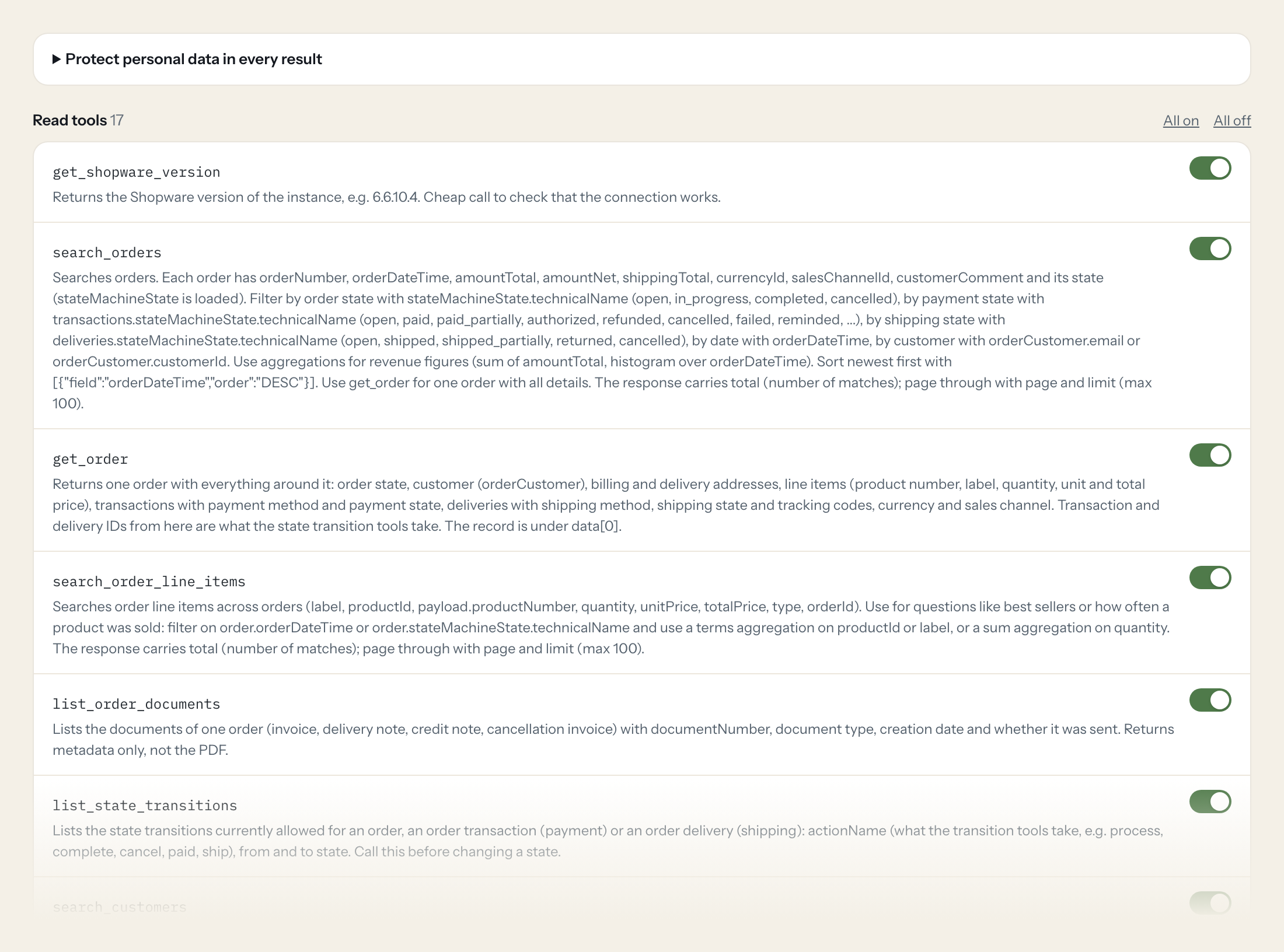
Seventeen read tools cover orders, line items, documents, allowed state transitions, customers, products, stock, reviews, categories, manufacturers, sales channels, promotions and newsletter recipients. Four write tools, the order, payment and shipping state and the stock of a product, stay off until you switch them on for a role.
- Customer service
“Where is order 10482? Is it paid and shipped?”
Answered by
get_order - Management
“Revenue per week in October, compared to September.”
Answered by
search_orders - Purchasing
“Which products have fewer than ten units available?”
Answered by
list_product_stock - E-commerce
“Which products sold best last month, by quantity?”
Answered by
search_order_line_items - Customer service
“Which orders are paid but still not shipped after three days?”
Answered by
search_orders - Purchasing
“Set the stock of SW-10027 to 140, the delivery has arrived.”
Answered by
update_product_stock
What the Shopware 6 connector can do.
| Tool | What it does | Access | Default |
|---|---|---|---|
| get_shopware_version | Returns the Shopware version of the instance, e.g. 6.6.10.4. | Read | On |
| search_orders | Searches orders. Each order has orderNumber, orderDateTime, amountTotal, amountNet, shippingTotal, currencyId, salesChannelId, customerComment and its state (stateMachineState i… | Read | On |
| get_order | Returns one order with everything around it: order state, customer (orderCustomer), billing and delivery addresses, line items (product number, label, quantity, unit and total p… | Read | On |
| search_order_line_items | Searches order line items across orders (label, productId, payload.productNumber, quantity, unitPrice, totalPrice, type, orderId). Use for questions like best sellers or how oft… | Read | On |
| list_order_documents | Lists the documents of one order (invoice, delivery note, credit note, cancellation invoice) with documentNumber, document type, creation date and whether it was sent. Returns m… | Read | On |
| list_state_transitions | Lists the state transitions currently allowed for an order, an order transaction (payment) or an order delivery (shipping): actionName (what the transition tools take, e.g. proc… | Read | On |
| search_customers | Searches customer accounts (customerNumber, firstName, lastName, email, company, active, guest, groupId, createdAt, lastLogin, orderCount, orderTotalAmount, lastOrderDate). Use… | Read | On |
| get_customer | Returns one customer with customer group, default billing and shipping address, all addresses, salutation, sales channel, tags and order statistics (orderCount, orderTotalAmount… | Read | On |
| search_products | Searches products and variants (productNumber, name, active, stock, availableStock, price, manufacturerId, parentId for variants, ean, manufacturerNumber, releaseDate, sales). V… | Read | On |
| get_product | Returns one product with manufacturer, categories, tax, unit, prices (advanced prices per rule), properties, variant options, variants (children), delivery time, cover image and… | Read | On |
| list_product_stock | Lists stock levels of products and variants, lowest availableStock first: productNumber, name, stock (physical stock), availableStock (stock minus open orders), active, isCloseo… | Read | On |
| list_product_reviews | Lists product reviews (title, content, points 1 to 5, status = published, productId, customerId, languageId, createdAt, comment = shop reply). The response carries total (number… | Read | On |
| list_categories | Lists categories of the storefront navigation (name, parentId, path, level, active, visible, type, childCount, productAssignmentType). Filter parentId for the children of one ca… | Read | On |
| list_manufacturers | Lists product manufacturers (brands) with name, link and description. Use the id to filter products by manufacturerId. | Read | On |
| list_sales_channels | Lists the sales channels (storefronts, headless channels, marketplaces) with name, type, active, default language, currency, country and maintenance mode. salesChannelId on orde… | Read | On |
| list_promotions | Lists promotions (name, active, validFrom, validUntil, code for a fixed code, useCodes, useIndividualCodes, maxRedemptionsGlobal, orderCount, priority, exclusive). The response… | Read | On |
| list_newsletter_recipients | Lists newsletter recipients (email, firstName, lastName, status: notSet, optIn, direct, optOut, confirmedAt, salesChannelId, createdAt). The response carries total (number of ma… | Read | On |
| transition_order_state | Moves an order (order status) to another state by running a state machine transition (order actions: process, complete, cancel, reopen). Only transitions allowed from the curren… | Write | Off |
| transition_order_payment_state | Moves the payment of an order (order transaction) to another state by running a state machine transition (payment actions: paid, paid_partially, authorize, remind, refund, refun… | Write | Off |
| transition_order_delivery_state | Moves the shipping of an order (order delivery) to another state by running a state machine transition (delivery actions: ship, ship_partially, retour, retour_partially, cancel,… | Write | Off |
| update_product_stock | Sets the physical stock of one product or variant to an absolute number. availableStock is recalculated by Shopware from it and the open orders. | Write | Off |
Write tools are off for every role until you switch them on, one tool for one role. The names are what the model sees; it also gets the full parameter description of each tool.
Getting the Shopware 6 token.
Five minutes, once. Nobody on your team ever sees it.
- 1
In the Shopware administration open Settings > System > Users & permissions > Roles and create a role (e.g. Loopthink read) with view permissions for orders, customers, products, categories, manufacturers, sales channels, promotions, reviews, newsletter recipients and documents. Add edit permission for orders or products only if the write tools are wanted.
- 2
Open Settings > System > Integrations and click Add integration. Enter a name such as Loopthink.
- 3
Leave Administrator switched off and assign the role from step 1 (switching Administrator on grants full access).
- 4
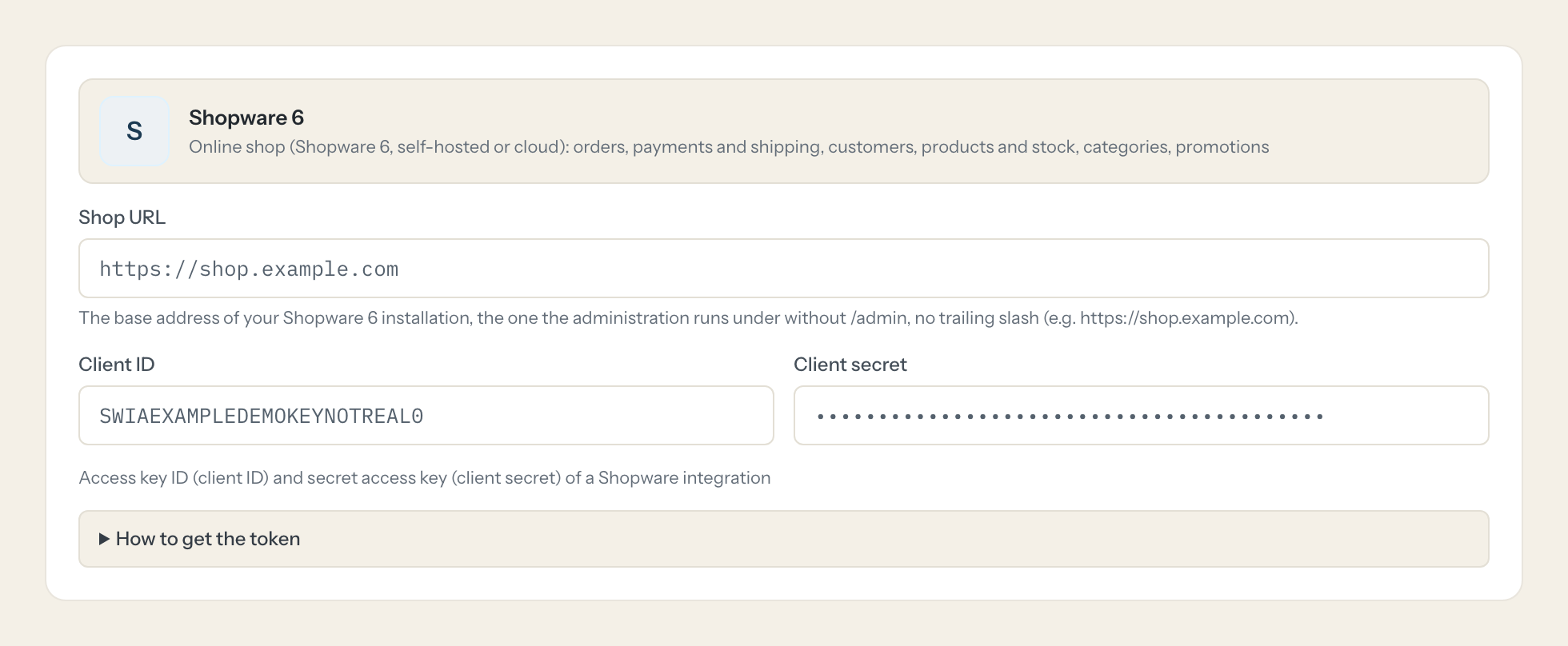
Copy the Access key ID (client ID) and the Secret access key (client secret). The secret is shown only once.
- 5
Enter both here together with the shop URL.
- 6
In Loopthink, add Shopware 6 from the catalog and paste the client id and secret. It also asks for shop url. Your team sees the tools a minute later.
An integration is a technical client, not a user account; its role decides what the server can read and change. Tokens live about 10 minutes and are fetched again automatically. Shopware 6.4 and newer are supported; the shop must be reachable over HTTPS.
What we suggest masking in Shopware 6.
Orders and customers are personal data from top to bottom: names, e-mail addresses, billing and delivery addresses, phone numbers, birthdays, VAT ids, IP addresses and customer comments. The suggested fields mask all of them for roles that only need revenue, states and stock; Customer service, who talks to the customer anyway, gets a role without that rule.
- firstName
- lastName
- title
- company
- department
- street
- additionalAddressLine1
- additionalAddressLine2
- zipcode
- city
- phoneNumber
- birthday
- vatId
- vatIds
- customerComment
- remoteAddress
- customerNumber
- trackingCodes
- externalUser
- externalEmail
- affiliateCode
- campaignCode
- hash
- content
- comment
- customFields
Shopware 6 and Loopthink
- Which permissions does the integration need?
- Create an integration with Administrator switched off and give it a role with view permissions for orders, customers, products, categories, manufacturers, sales channels, promotions, reviews, newsletter recipients and documents. Add edit permission for orders or products only if you want the write tools. The connector signs in with the access key ID and secret (client credentials) and fetches a fresh token about every ten minutes.
- Does a state change send an email to the customer?
- It can. Changing the order, payment or shipping state runs Shopware's state machine, and depending on the flows set up in your shop this sends the usual customer mail, for example a shipping confirmation. Check your Flow Builder before you switch the transition tools on for a role.
- Our shop is self-hosted. Does the connector reach it?
- Yes, if the shop is reachable from the internet over HTTPS, which a live shop usually is. Shopware 6.4 and newer are supported, self-hosted or cloud. If your administration API is only reachable in your network, tell us and we look at it with you.
- Does every team member need their own Shopware 6 account?
- No. Loopthink holds one key or token for Shopware 6. Your people sign in to Loopthink with their own identity, and every call to Shopware 6 is logged under their name. Seats in Shopware 6 stay where they are today.
- Where does the Shopware 6 key live?
- In Loopthink, encrypted, in the EU. It never reaches the AI client and never reaches the people using the connector. Rotate it in Shopware 6 whenever you like and paste the new one once.
- Can somebody write to Shopware 6 from the chat?
- Not unless you switch it on. Write actions are a separate row in the permission matrix and are off for every role by default. If a role needs one write tool, you grant that one tool to that one role.
- What does the model see?
- The result of the tool call, after masking. Fields you mark as personal, such as emails, names or card details, are masked before the answer travels to the AI client. The model gets the numbers, not the people.
- What does it cost?
- Free for one person and two connectors, no card. Pro is €19 a month for up to five people and every connector on the site, with roles, field masking and a 30-day audit. Team is €49 for ten people and adds your own REST APIs and SQL databases, your own domain and your own identity provider. No call needed.
Stuck, or a tool you need is missing? A person who knows this connector answers within one working day.


