troi in Claude, ChatGPT and any MCP client. For your whole team.
Projects, customers, contacts, calculation positions, time entries, absences, tasks. One token in Loopthink, one login per person, roles per tool and an audit entry for every call.
Free for 2 connectors, no card · Pro €19 · EU-hosted · 22 read tools, 2 write tools off by default
“Which calculation positions of the Kaufmann Relaunch are over their planned hours?”
Three positions are over plan:
| Position | Planned h | Booked h | Deviation |
|---|---|---|---|
| Frontend development | 240.0 | 287.5 | +47.5 |
| Content migration | 80.0 | 96.3 | +16.3 |
| Project management | 60.0 | 64.8 | +4.8 |
- read-only
- logged
One token in, the tools come out.
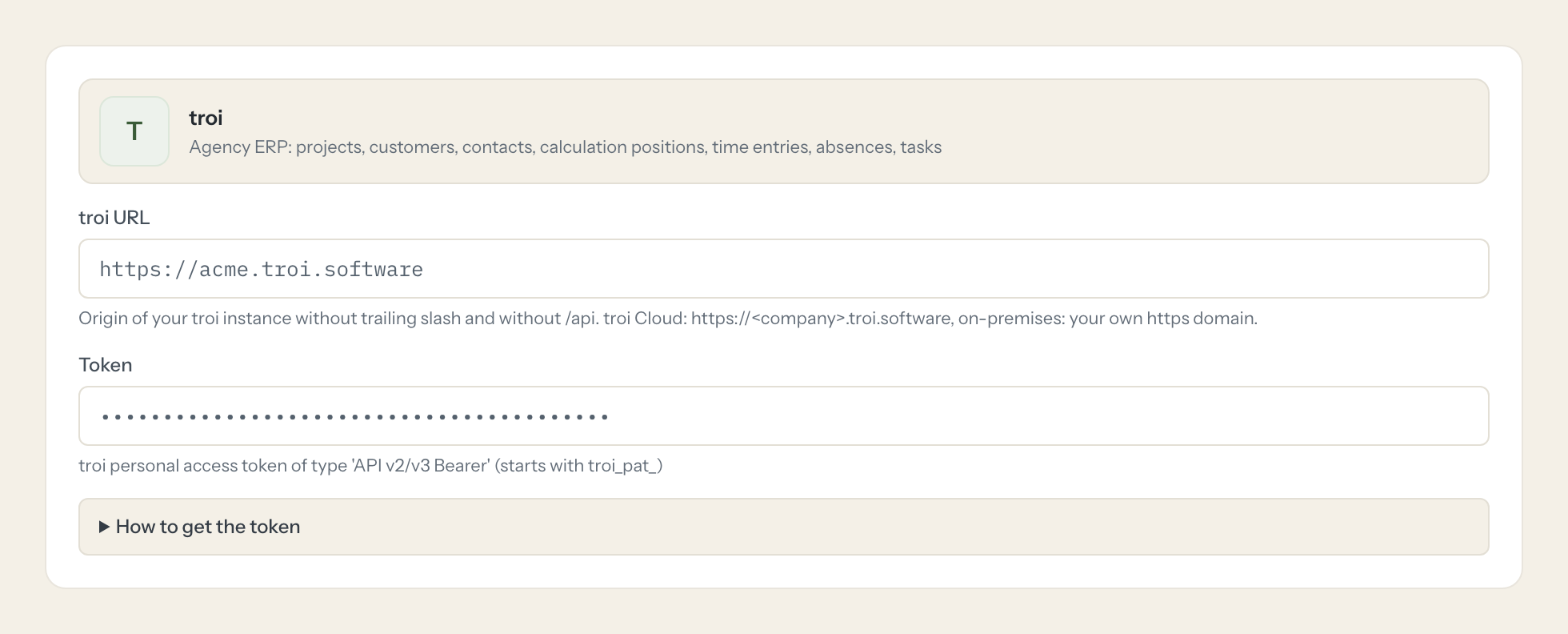
troi is the agency's ERP: customers and their projects, the calculation positions that hold the budget, the hours booked against them, absences, tasks, offers and invoices, and the billing proposals at the end of the month. The questions are simple, "how much of the Kaufmann budget is already spent", "who booked what on the relaunch last week", but today they take the right tenant, the project tree and a report that only the controller knows how to run.
With the troi connector, Project Managers, Controlling and Management ask in Claude or ChatGPT and get the answer from the live instance. Loopthink holds one troi personal access token, every person signs in with their own identity, and every call is logged under their name. The token never reaches the AI client.
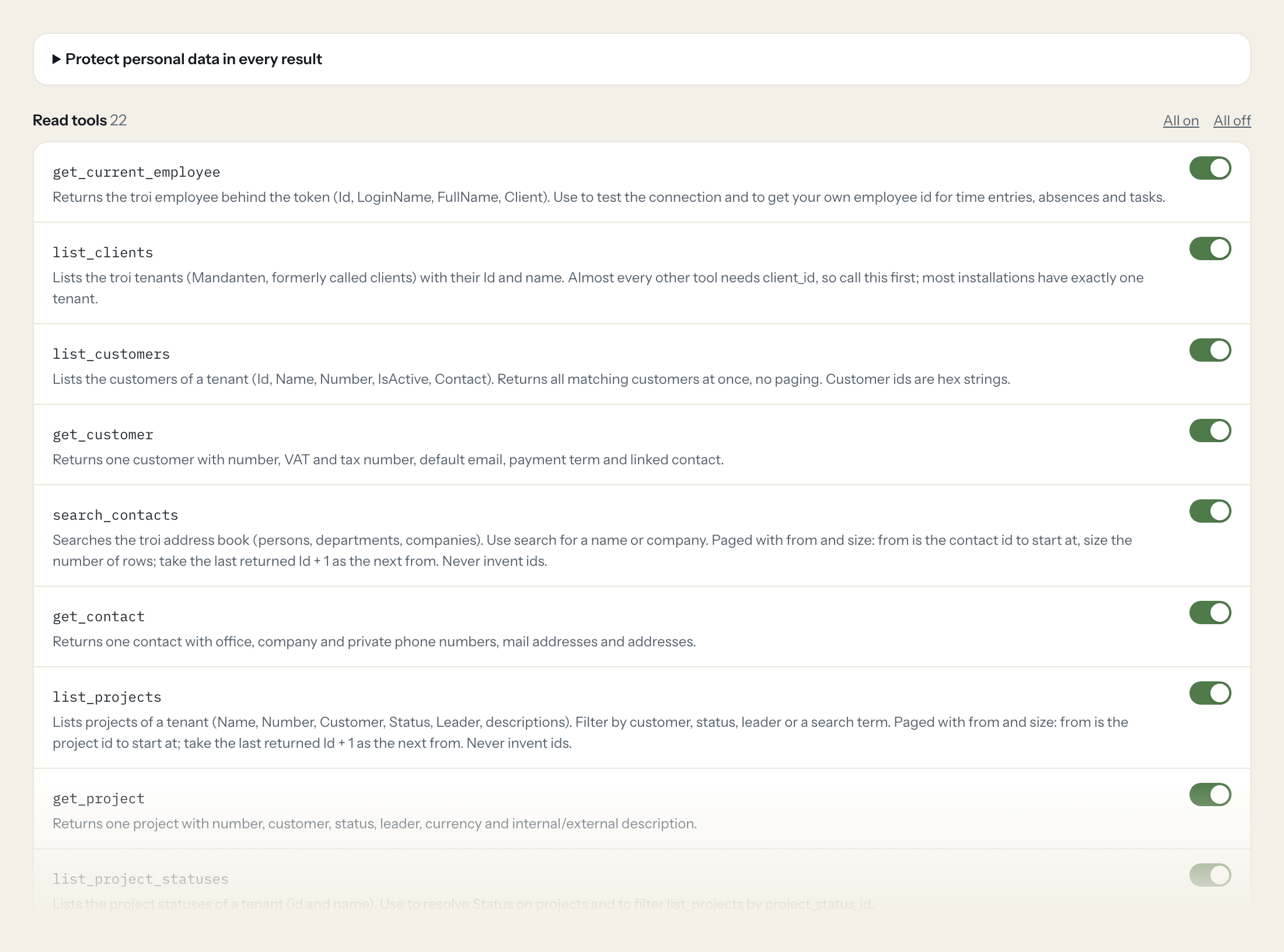
Twenty-two read tools cover tenants, customers, contacts, projects, subprojects, project statuses, calculation positions, time entries, recorded hours per employee, employees, absences, calendar events, tasks, documents and billing proposals. The two write tools, recording hours and creating a task, stay off until you switch them on for a role.
- Controlling
“Which calculation positions of the Kaufmann Relaunch are over their planned hours?”
Answered by
list_calculation_positions - Project Manager
“Who booked hours on the Kaufmann Relaunch last week, and on which positions?”
Answered by
list_time_entries - Management
“How many hours did Jonas Rieger record in September, grouped by project?”
Answered by
get_employee_recorded_hours - Controlling
“Which billing proposals are waiting for October?”
Answered by
list_billing_proposals - Project Manager
“Who from the design team is absent in the second week of November?”
Answered by
list_absences - Project Manager
“Book 2.5 hours on the Kaufmann Relaunch, position "Konzeption", for today with the remark "Kick-off preparation".”
Answered by
create_time_entry
What the troi connector can do.
| Tool | What it does | Access | Default |
|---|---|---|---|
| get_current_employee | Returns the troi employee behind the token (Id, LoginName, FullName, Client). Use to test the connection and to get your own employee id for time entries, absences and tasks. | Read | On |
| list_clients | Lists the troi tenants (Mandanten, formerly called clients) with their Id and name. Almost every other tool needs client_id, so call this first; most installations have exactly… | Read | On |
| list_customers | Lists the customers of a tenant (Id, Name, Number, IsActive, Contact). Returns all matching customers at once, no paging. | Read | On |
| get_customer | Returns one customer with number, VAT and tax number, default email, payment term and linked contact. | Read | On |
| search_contacts | Searches the troi address book (persons, departments, companies). Use search for a name or company. | Read | On |
| get_contact | Returns one contact with office, company and private phone numbers, mail addresses and addresses. | Read | On |
| list_projects | Lists projects of a tenant (Name, Number, Customer, Status, Leader, descriptions). Filter by customer, status, leader or a search term. | Read | On |
| get_project | Returns one project with number, customer, status, leader, currency and internal/external description. | Read | On |
| list_project_statuses | Lists the project statuses of a tenant (id and name). Use to resolve Status on projects and to filter list_projects by project_status_id. | Read | On |
| list_subprojects | Lists subprojects of a tenant, optionally only those of one project or several projects. | Read | On |
| list_calculation_positions | Lists calculation positions (Kalkulationspositionen, the bookable budget lines of a project) with planned and spent values. Time entries are booked on these ids. | Read | On |
| list_time_entries | Lists recorded hours (Stundenbuchungen) of a tenant: Date, Quantity (hours), Remark, Employee, CalculationPosition, billable/billed/invoiced flags. troi requires at least one of… | Read | On |
| get_employee_recorded_hours | Returns the hours one employee recorded in a period, grouped by project. Use for 'how much did X work on what'. | Read | On |
| list_employees | Lists employees of a tenant (Id, LoginName, FirstName, LastName, FullName, SmtpAddress, IsActive). Use to resolve employee ids. | Read | On |
| list_absences | Lists absences (vacation, illness, etc.) in a date range, for the current employee or a given employee. Dates as YYYYMMDD numbers. | Read | On |
| list_absence_types | Lists the absence types (vacation, illness, ...) available to the current employee. Use to resolve the type on absences. | Read | On |
| list_calendar_events | Lists calendar events in a date range (YYYYMMDD). Optional search term, owner and type (R regular, H holiday, G general, P private, T assignment). | Read | On |
| list_tasks | Lists troi tasks, optionally by type (ApiTask:Task, ApiTask:ProjectTask, ApiTask:ProjectWarning) and by sender or assignee employee. | Read | On |
| get_task | Returns one task with subject, description, comment, dates, priority, status, project and employees. | Read | On |
| list_documents | Lists commercial documents (offers, invoices, ...) of a tenant, optionally per customer or project. Paged with from (zero-based offset) and size; increase from by size for the n… | Read | On |
| list_billing_proposals | Lists billing proposals (Abrechnungsvorschläge) from the troi API v3. Returns the whole list at once. | Read | On |
| get_billing_proposal | Returns one billing proposal from the troi API v3. | Read | On |
| create_time_entry | WRITE: Records hours for an employee on a calculation position. Get client_id from list_clients, calculation_position_id from list_calculation_positions (time_recording=true), e… | Write | Off |
| create_task | WRITE: Creates a general troi task (ApiTask:Task) from one employee to another, with subject, description and optional start/end date ('YYYY-MM-DD HH:MM:SS'). | Write | Off |
Write tools are off for every role until you switch them on, one tool for one role. The names are what the model sees; it also gets the full parameter description of each tool.
Getting the troi token.
Five minutes, once. Nobody on your team ever sees it.
- 1
As admin: troi menu > Employees > Users > select the user > tab Program > API section, set API access to 'read-only' (or 'read/write' if write tools are enabled).
- 2
Log in as that user and open troi menu > Employees > Security Centre.
- 3
Under 'Personal access tokens' create a token of type 'API v2/v3 Bearer' (not 'API v3 Basic', not the classic v2 employee token, not OAuth2).
- 4
Copy the token (troi_pat_...) and paste it into Loopthink. Tokens expire after one year; each user can have at most 5.
- 5
In Loopthink, add troi from the catalog and paste the token. It also asks for troi url. Your team sees the tools a minute later.
The token acts with the rights of its user. troi enforces read-only at the user level, which is the safest setting. Booking time for other employees needs the 'API impersonation' checkbox on both users. Hosted troi uses <company>.troi.software; the API lives under /api/v2/rest and /api/v3/rest on the same host.
What we suggest masking in troi.
troi carries personal data on employees and contacts: names and login names, office and private email, phone and mobile numbers, private and company addresses, birthdays, VAT and tax numbers of customers, and free text in remarks, descriptions, comments and subjects. The suggested fields mask all of these and keep project, customer number, calculation position, dates, quantities, status and the billable flags, so a Management role can see that 142 of 160 planned hours on the Kaufmann Relaunch are spent without reading the remark on each booking.
- Name
- Name1
- Name2
- Name3
- FirstName
- LastName
- FullName
- LoginName
- SmtpAddress
- customerDefaultEmail
- OfficeMail
- OfficePhone
- OfficeMobile
- OfficeFax
- CompanyMail
- CompanyPhone
- PrivateMail
- PrivatePhone
- PrivateMobile
- PrivateAddressStreet
- PrivateAddressCity
- PrivateAddressZipCode
- CompanyAddressStreet
- CompanyAddressCity
- CompanyAddressZipCode
- Birthday
- Remark
- VatNumber
- TaxNumber
- Description
- Comment
- Subject
troi and Loopthink
- Which token type and which API access level do we need?
- A personal access token of type API v2/v3 Bearer, created in the Security Centre of the user Loopthink should act as; it starts with troi_pat_. Not the API v3 Basic type, not the classic v2 employee token and not OAuth2. On the user's Program tab, set API access to read-only for the read tools; read/write is only needed if you enable create_time_entry or create_task. Tokens expire after one year, and each user can hold at most five.
- Can the AI book hours for other employees?
- Only with the API impersonation checkbox switched on for both users in troi, and only if create_time_entry is enabled for a role in Loopthink. Without impersonation, hours are recorded for the employee behind the token, which is why most teams keep the token read-only.
- troi Cloud or on-premises, and why does every question start with the tenant?
- Both work: hosted troi runs at <company>.troi.software, on-premises on your own https domain; the API lives under /api/v2/rest and /api/v3/rest on the same host. Almost every tool needs a client_id, the troi tenant (Mandant), so the model calls list_clients first. Most installations have exactly one.
- Does every team member need their own troi account?
- No. Loopthink holds one key or token for troi. Your people sign in to Loopthink with their own identity, and every call to troi is logged under their name. Seats in troi stay where they are today.
- Where does the troi key live?
- In Loopthink, encrypted, in the EU. It never reaches the AI client and never reaches the people using the connector. Rotate it in troi whenever you like and paste the new one once.
- Can somebody write to troi from the chat?
- Not unless you switch it on. Write actions are a separate row in the permission matrix and are off for every role by default. If a role needs one write tool, you grant that one tool to that one role.
- What does the model see?
- The result of the tool call, after masking. Fields you mark as personal, such as emails, names or card details, are masked before the answer travels to the AI client. The model gets the numbers, not the people.
- What does it cost?
- Free for one person and two connectors, no card. Pro is €19 a month for up to five people and every connector on the site, with roles, field masking and a 30-day audit. Team is €49 for ten people and adds your own REST APIs and SQL databases, your own domain and your own identity provider. No call needed.
Stuck, or a tool you need is missing? A person who knows this connector answers within one working day.

