IMAP Mailbox in Claude, ChatGPT and any MCP client. For your whole team.
Read a shared mailbox over IMAP: search, read messages and attachments. Exchange, IONOS, Strato, Gmail. One technical login in Loopthink, one login per person, roles per tool and an audit entry for every call.
Free for 2 connectors, no card · Pro €19 · EU-hosted · 5 read tools, 2 write tools off by default
“Which invoices arrived in invoices@ this week?”
Three invoices came in this week, two of them unread:
| Date | From | Subject | Attachments |
|---|---|---|---|
| 24 Oct 2026 | Supplier GmbH | Invoice 4711 | 1 |
| 23 Oct 2026 | Kraus & Partner | RE-2026-0884 | 1 |
| 21 Oct 2026 | Stadtwerke Nord | Your October statement | 2 |
- read-only
- masked
Credentials in once, the tools come out.
Invoices, orders, applications and support requests still arrive in function mailboxes: invoices@, orders@, jobs@. Someone opens the mailbox, searches, reads, downloads the attachment and types what is in it somewhere else.
With the IMAP connector, Accounting, Sales back office and HR ask in Claude or ChatGPT what came in and what it says. It works with any IMAP mailbox: Exchange on-premises, IONOS, Strato, Gmail and Microsoft 365 with an app password. Loopthink holds one login for the mailbox, every person signs in with their own identity, and every call is logged under their name.
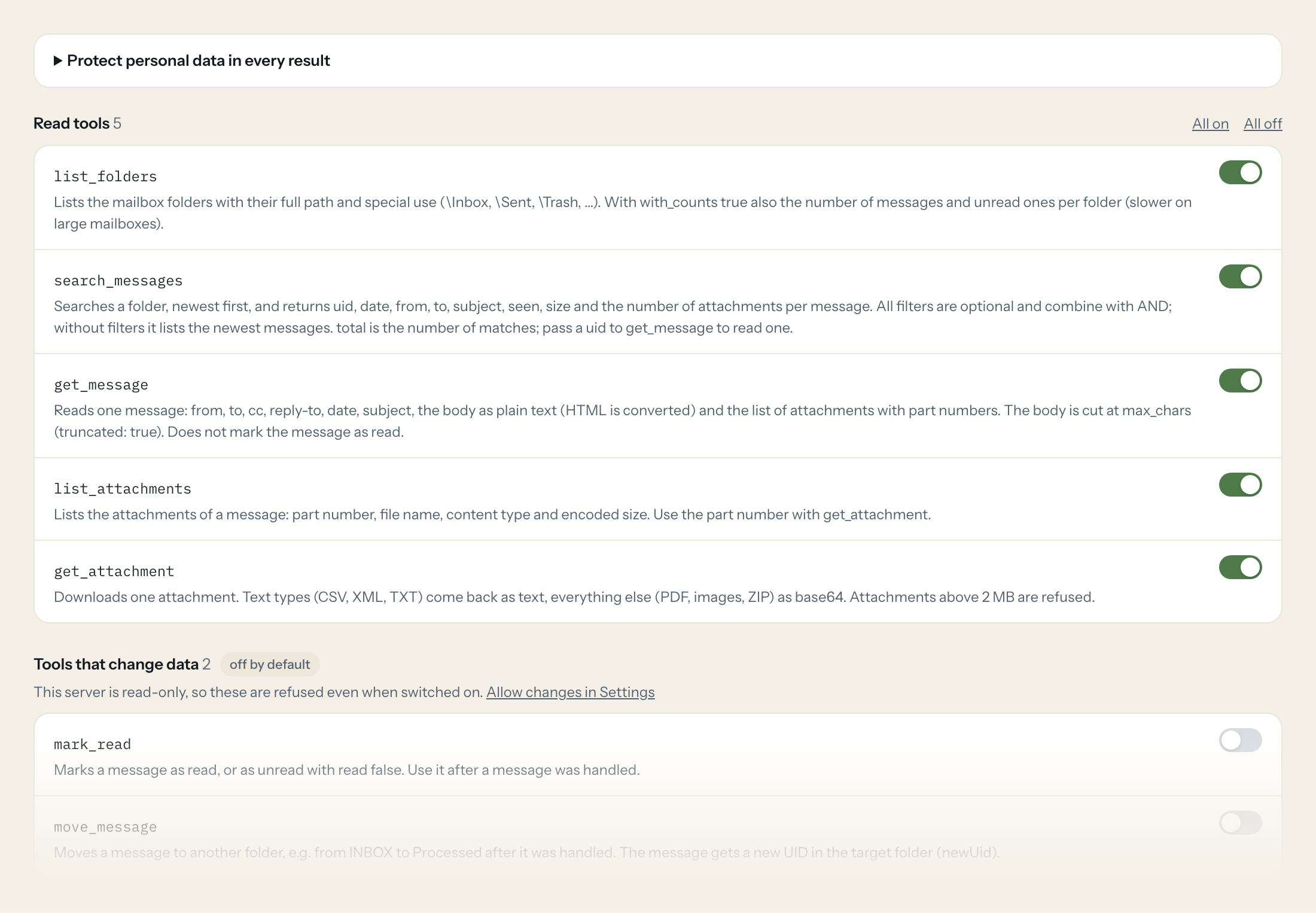
Five read tools list folders, search messages, read one, list its attachments and fetch one. Reading never marks a message as read. Two write tools, mark as read and move to another folder, stay off until you switch them on for a role.
- Accounting
“Which invoices arrived in invoices@ this week, with sender and amount?”
Answered by
search_messages - Accounting
“Read the CSV attached to the invoice from Supplier GmbH.”
Answered by
get_attachment - Sales back office
“Are there unread orders from Kraus & Partner?”
Answered by
search_messages - Sales back office
“Summarise the last mail from Nordwind and what they ask for.”
Answered by
get_message - HR
“How many applications came in for the developer position since Monday?”
Answered by
search_messages - Accounting
“Move the invoices I just booked to the folder Booked.”
Answered by
move_message
What the IMAP Mailbox connector can do.
| Tool | What it does | Access | Default |
|---|---|---|---|
| list_folders | Lists the mailbox folders with their full path and special use (\Inbox, \Sent, \Trash, …). With with_counts true also the number of messages and unread ones per folder (slower o… | Read | On |
| search_messages | Searches a folder, newest first, and returns uid, date, from, to, subject, seen, size and the number of attachments per message. All filters are optional and combine with AND; w… | Read | On |
| get_message | Reads one message: from, to, cc, reply-to, date, subject, the body as plain text (HTML is converted) and the list of attachments with part numbers. The body is cut at max_chars… | Read | On |
| list_attachments | Lists the attachments of a message: part number, file name, content type and encoded size. Use the part number with get_attachment. | Read | On |
| get_attachment | Downloads one attachment. Text types (CSV, XML, TXT) come back as text, everything else (PDF, images, ZIP) as base64. | Read | On |
| mark_read | Marks a message as read, or as unread with read false. Use it after a message was handled. | Write | Off |
| move_message | Moves a message to another folder, e.g. from INBOX to Processed after it was handled. | Write | Off |
Write tools are off for every role until you switch them on, one tool for one role. The names are what the model sees; it also gets the full parameter description of each tool.
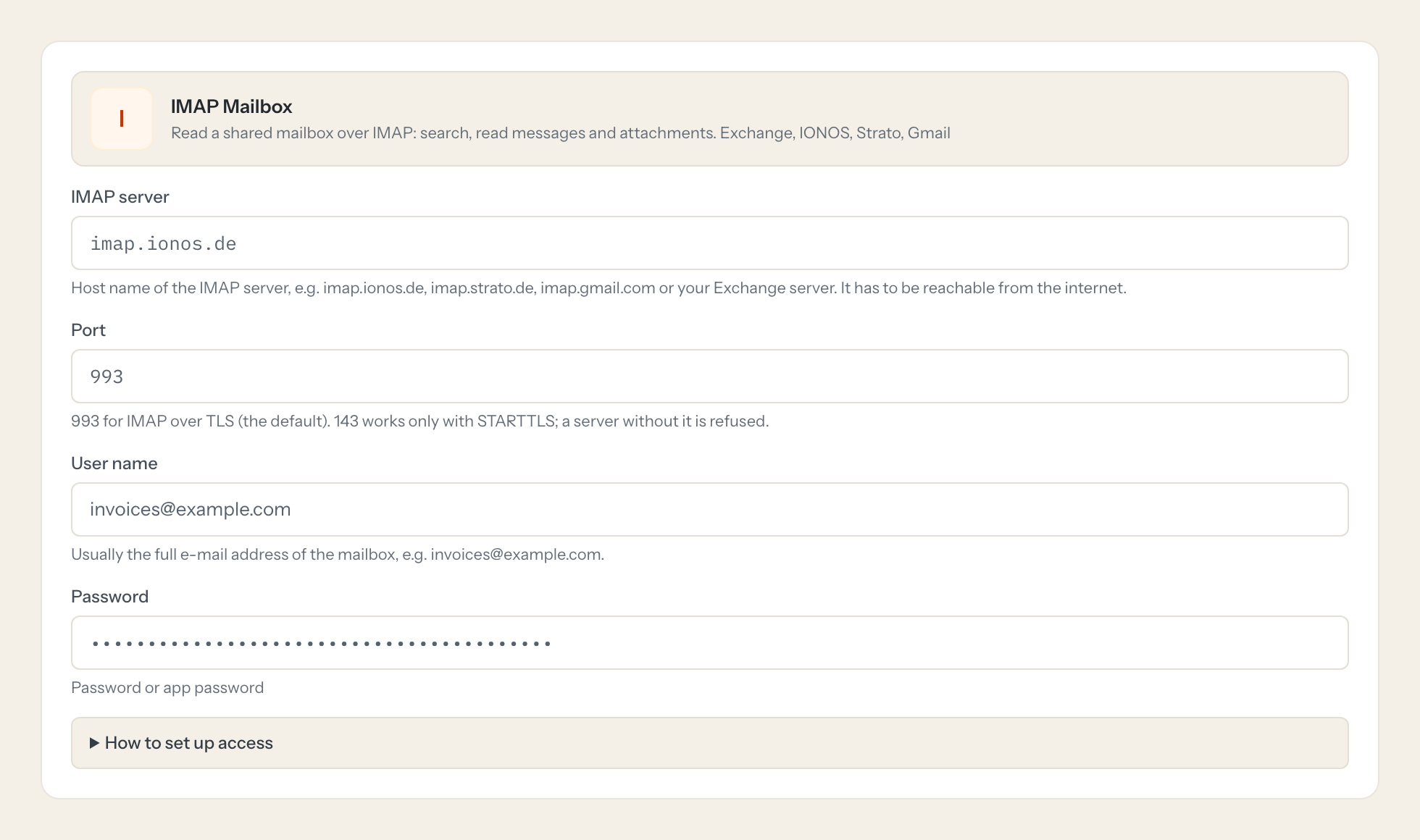
Setting up access to IMAP Mailbox.
Five minutes, once. Nobody on your team ever sees the credentials.
- 1
Use a function mailbox (invoices@, support@) rather than a person's mailbox, and make sure IMAP is enabled for it.
- 2
Gmail and Microsoft 365 accounts with two-factor sign-in need an app password: Google Account > Security > App passwords. IONOS and Strato take the mailbox password.
- 3
Exchange on-premises: IMAP has to be enabled on the server and published to the internet on port 993.
- 4
Paste the password or app password here and click 'Test connection'.
- 5
In Loopthink, add IMAP Mailbox from the catalog and enter the password. It also asks for imap server, port and user name. Your team sees the tools a minute later.
Reading never marks a message as read. Sender, recipients, subject and body are plain fields (from, to, cc, subject, text) and can be masked like any other field.
What we suggest masking in IMAP Mailbox.
A mailbox is personal data in every field: who wrote, to whom, about what. Sender, recipients, subject and body come back as plain fields (from, to, cc, subject, text), so they are masked like any other field. A role that only needs counts and dates gets the addresses and the body removed; Accounting, who books the invoice, sees them.
- from
- to
- cc
- replyTo
- subject
- text
- filename
IMAP Mailbox and Loopthink
- Does reading a message mark it as read?
- No. Messages are opened read-only and fetched without setting the read flag. Only mark_read changes it, and that tool is off until you switch it on.
- Does it work with Gmail and Microsoft 365?
- With an app password, yes: Gmail and Microsoft 365 accounts with two-factor sign-in need one for IMAP. Exchange on-premises needs IMAP enabled and reachable on port 993.
- Can the assistant send mail?
- Not yet. Sending over SMTP is planned as a separate tool that stays off until you switch it on.
- How large can an attachment be?
- Up to 2 MB per attachment. Text attachments such as CSV and XML come back as text, everything else as base64.
- Does every team member need their own IMAP Mailbox account?
- No. Loopthink holds one key or token for IMAP Mailbox. Your people sign in to Loopthink with their own identity, and every call to IMAP Mailbox is logged under their name. Seats in IMAP Mailbox stay where they are today.
- Where does the IMAP Mailbox key live?
- In Loopthink, encrypted, in the EU. It never reaches the AI client and never reaches the people using the connector. Rotate it in IMAP Mailbox whenever you like and paste the new one once.
- Can somebody write to IMAP Mailbox from the chat?
- Not unless you switch it on. Write actions are a separate row in the permission matrix and are off for every role by default. If a role needs one write tool, you grant that one tool to that one role.
- What does the model see?
- The result of the tool call, after masking. Fields you mark as personal, such as emails, names or card details, are masked before the answer travels to the AI client. The model gets the numbers, not the people.
- What does it cost?
- Free for one person and two connectors, no card. Pro is €19 a month for up to five people and every connector on the site, with roles, field masking and a 30-day audit. Team is €49 for ten people and adds your own REST APIs and SQL databases, your own domain and your own identity provider. No call needed.
Stuck, or a tool you need is missing? A person who knows this connector answers within one working day.


