SFTP in Claude, ChatGPT and any MCP client. For your whole team.
List, read, upload and move, confined to one folder. One technical login in Loopthink, one login per person, roles per tool and an audit entry for every call.
Free for 2 connectors, no card · Pro €19 · EU-hosted · 3 read tools, 3 write tools off by default
“What arrived in the inbound folder since Monday?”
Three files came in since Monday:
| File | Size | Received |
|---|---|---|
| camt053-2026-10-24.xml | 84 KB | 24 Oct 06:02 |
| deliverynote-88213.csv | 3 KB | 23 Oct 17:40 |
| camt053-2026-10-23.xml | 79 KB | 23 Oct 06:01 |
- read-only
- masked
Credentials in once, the tools come out.
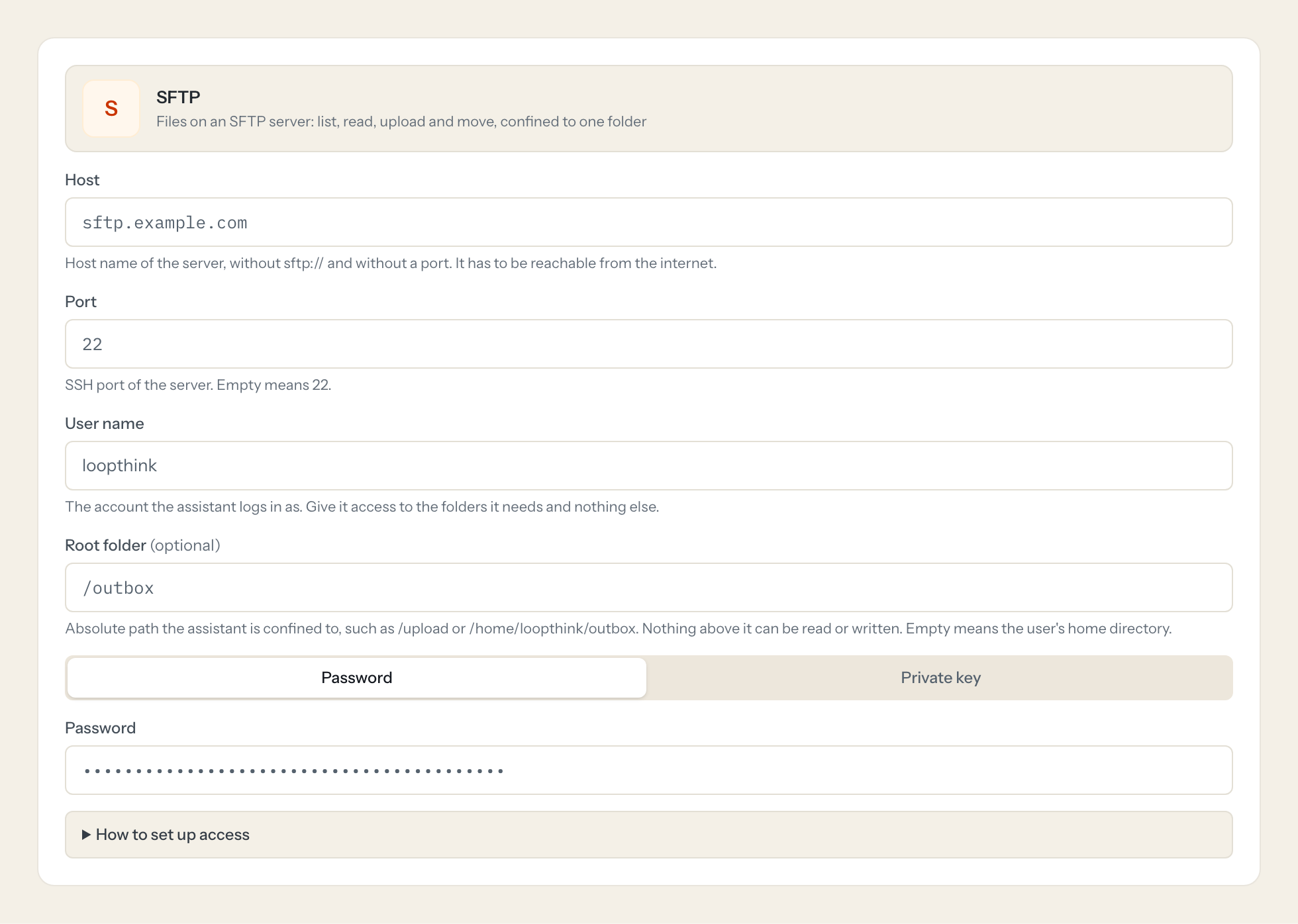
SFTP is how banks, logistics partners, marketplaces and hosters still hand over files: statements in MT940 or CAMT, delivery notes as CSV, EDI orders, exports that land in an inbox folder every night. Someone opens a client, downloads the file and reads it, every time.
With the SFTP connector, Finance, Logistics and Operations ask in Claude or ChatGPT what arrived and what it says. Loopthink holds one login for one folder, every person signs in with their own identity, and every call is logged under their name with the path it touched.
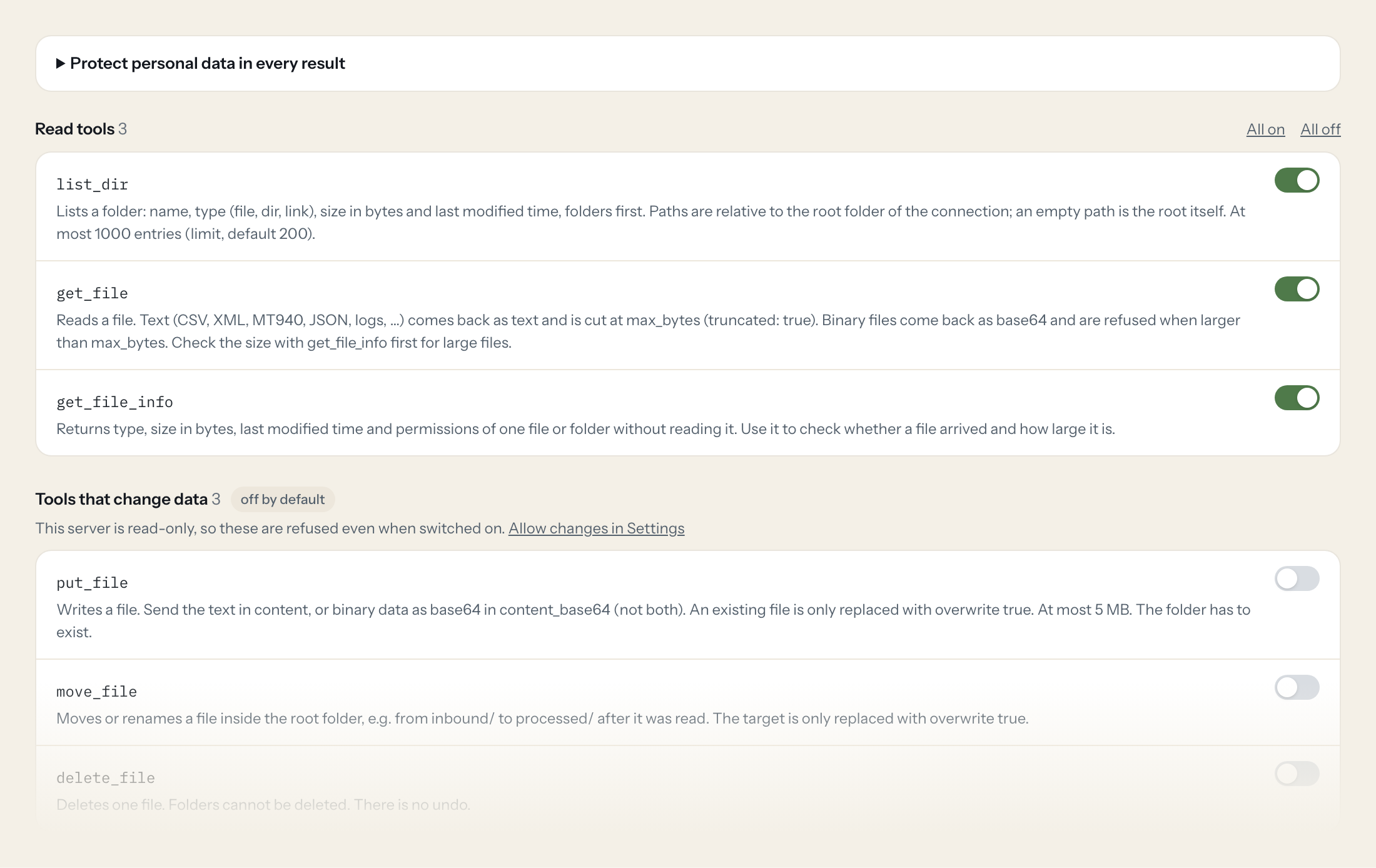
Three read tools list a folder, read a file and show its details. Three write tools, upload, move and delete, stay off until you switch them on for a role. Every path is confined to the root folder you set: nothing above it can be read or written, not even through a symbolic link.
- Finance
“Did today's bank statement arrive, and what is the closing balance?”
Answered by
get_file - Logistics
“Which delivery notes came in since Monday?”
Answered by
list_dir - Finance
“List all payments over 10,000 EUR in yesterday's CAMT file.”
Answered by
get_file - Operations
“Is the nightly export there, and how large is it compared to last night?”
Answered by
get_file_info - Logistics
“Upload this order as order-4711.csv to the outbound folder.”
Answered by
put_file - Operations
“Move the files I just checked to processed.”
Answered by
move_file
What the SFTP connector can do.
| Tool | What it does | Access | Default |
|---|---|---|---|
| list_dir | Lists a folder: name, type (file, dir, link), size in bytes and last modified time, folders first. Paths are relative to the root folder of the connection; an empty path is the… | Read | On |
| get_file | Reads a file. Text (CSV, XML, MT940, JSON, logs, …) comes back as text and is cut at max_bytes (truncated: true). | Read | On |
| get_file_info | Returns type, size in bytes, last modified time and permissions of one file or folder without reading it. Use it to check whether a file arrived and how large it is. | Read | On |
| put_file | Writes a file. Send the text in content, or binary data as base64 in content_base64 (not both). | Write | Off |
| move_file | Moves or renames a file inside the root folder, e.g. from inbound/ to processed/ after it was read. | Write | Off |
| delete_file | Deletes one file. Folders cannot be deleted. | Write | Off |
Write tools are off for every role until you switch them on, one tool for one role. The names are what the model sees; it also gets the full parameter description of each tool.
Setting up access to SFTP.
Five minutes, once. Nobody on your team ever sees the credentials.
- 1
Create a dedicated user on the server (or ask your provider for one) that only reaches the folders the assistant should see.
- 2
Either set a password, or better, create a key pair (ssh-keygen -t ed25519) and add the public key to ~/.ssh/authorized_keys of that user.
- 3
Paste the password, or the private key (the whole block from -----BEGIN to -----END), here. Add the passphrase if the key has one.
- 4
Click 'Test connection'. The server's host key fingerprint is shown and pinned. Compare it with the one your provider or admin gives you (ssh-keyscan host | ssh-keygen -lf -).
- 5
In Loopthink, add SFTP from the catalog and enter the password or private key. It also asks for host, port, user name and root folder. Your team sees the tools a minute later.
The host key is pinned on the first connection. If it changes later, every call is blocked until an admin confirms the new fingerprint under Settings.
What we suggest masking in SFTP.
Files from banks and partners carry names, IBANs and addresses in every line. File contents come back in one field, so a rule on content removes or masks them for a role, and the IBAN and e-mail patterns catch those values wherever they appear. Give Finance the content and other roles the list of files.
- content
- name
SFTP and Loopthink
- How does the connector know it talks to our server and not an impostor?
- On the first connection it records the server's host key and shows you the fingerprint, so you can compare it with the one your provider gives you. If the key ever changes, every call is blocked until an admin looks at the new fingerprint and confirms it.
- Can the assistant reach files outside the folder we chose?
- No. Every path is resolved against the root folder, first as text and then on the server itself, so .. and symbolic links that point elsewhere are refused.
- Password or key?
- Both work. A key (Ed25519 or RSA, with or without passphrase) is better: it can be limited on the server and replaced without telling anyone a new password.
- How large can a file be?
- Text is read up to 2 MB per call and cut with a note when it is longer. Binary files come back as base64 up to 2 MB. Uploads are limited to 5 MB.
- Does every team member need their own SFTP account?
- No. Loopthink holds one key or token for SFTP. Your people sign in to Loopthink with their own identity, and every call to SFTP is logged under their name. Seats in SFTP stay where they are today.
- Where does the SFTP key live?
- In Loopthink, encrypted, in the EU. It never reaches the AI client and never reaches the people using the connector. Rotate it in SFTP whenever you like and paste the new one once.
- Can somebody write to SFTP from the chat?
- Not unless you switch it on. Write actions are a separate row in the permission matrix and are off for every role by default. If a role needs one write tool, you grant that one tool to that one role.
- What does the model see?
- The result of the tool call, after masking. Fields you mark as personal, such as emails, names or card details, are masked before the answer travels to the AI client. The model gets the numbers, not the people.
- What does it cost?
- Free for one person and two connectors, no card. Pro is €19 a month for up to five people and every connector on the site, with roles, field masking and a 30-day audit. Team is €49 for ten people and adds your own REST APIs and SQL databases, your own domain and your own identity provider. No call needed.
Stuck, or a tool you need is missing? A person who knows this connector answers within one working day.


